Buyer's Guide: How to Evaluate an Edge AI Platform for Industrial Use
8 questions to put to every vendor before an edge pilot becomes a production fleet

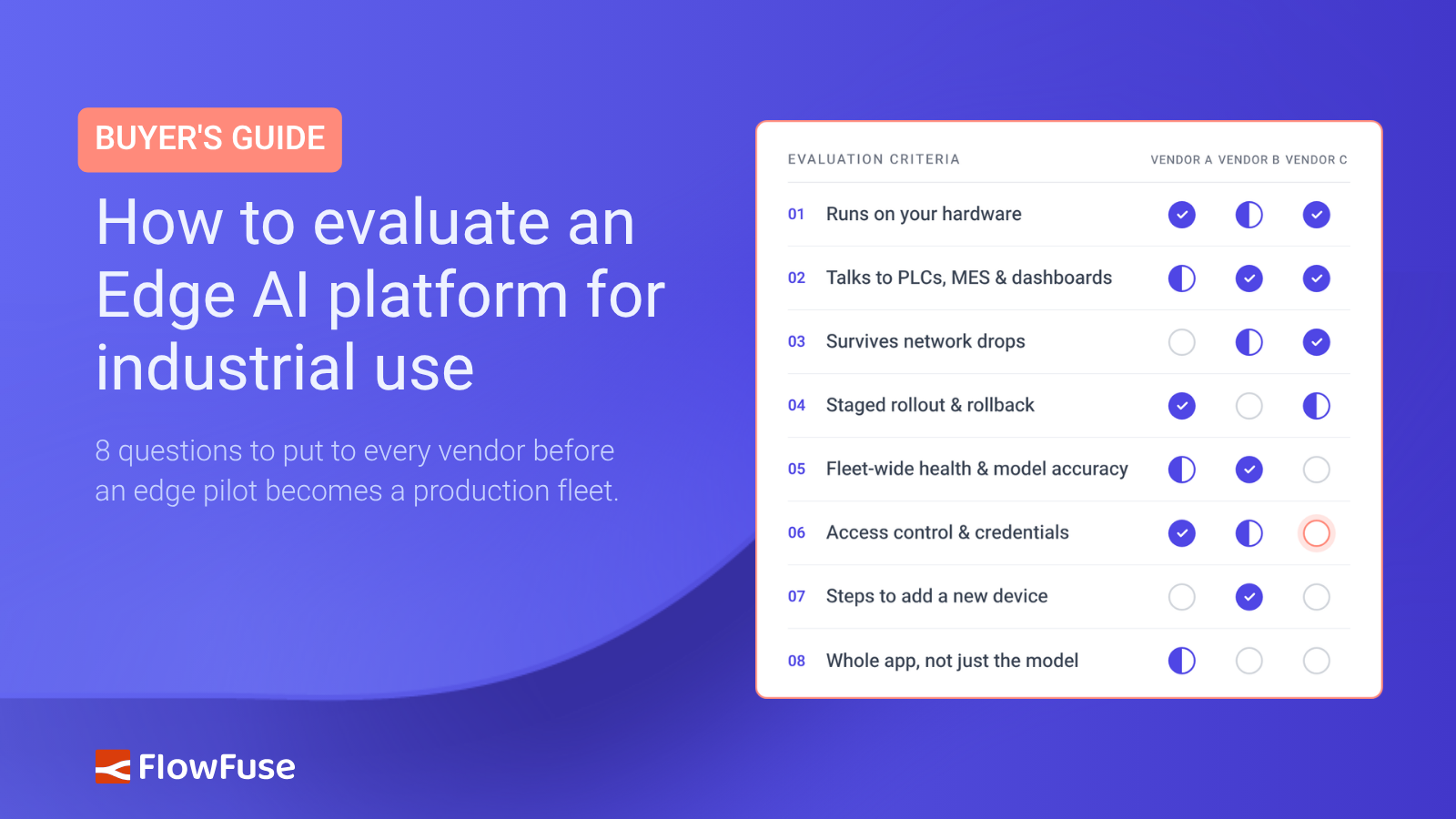
- Running the model is the easy part. The platform has to support everything around it.
- Check hardware, integration, offline operation, updates, monitoring, security, and scale.
- Test on your real hardware and plan for the full fleet. A single-device pilot hides most production problems.
Most edge AI platforms can run your model. The real test is what happens after the pilot.
Can it pull data from a PLC, keep working through a network outage, and roll out updates across 50 devices without turning each deployment into a separate project?
We see these challenges across industrial environments. FlowFuse runs in more than 120 plants across 20+ countries, and more than 200 teams use its AI features to build and run applications. The model is only one part of the equation. Data access, connectivity, deployment, and ongoing maintenance are what determine whether a pilot can scale.
This guide covers what to evaluate before choosing an edge AI platform, along with the questions to ask every vendor, including us.
What Is an Edge AI Platform?
An edge AI platform is the software that runs and manages AI applications close to where data is produced, on industrial PCs, gateways, and other devices on the factory floor. Its purpose is to let AI act on that data locally: taking in signals from PLCs, cameras, and sensors, running the model, and passing the results to the machines, databases, and people that need them, without depending on a round trip to the cloud.
What to Look For
The list starts with what a single device needs and works outward to running a whole fleet.
1. Hardware
Edge hardware varies more than most teams expect. In production, your model might run on an industrial PC with a GPU, a small embedded computer, or a gateway with little memory to spare, and each behaves differently. Benchmarks from a developer's workstation tell you very little about any of them.
Start with the hardware you plan to deploy on, and check which model formats and accelerators the platform supports there. Then test on that hardware, with everything else the device will run. A model that runs comfortably on its own can slow down once it shares the device with data collection, a dashboard, and other applications.
2. Integration
A prediction nobody acts on is worth nothing. Data has to reach the model, and its results have to reach the people and systems that respond. This is where many projects get harder than expected.
Say a camera spots a defective part. The result might need to signal a PLC, publish an MQTT message, update a record in the MES, and show up on an operator's dashboard. If the platform only runs the model, you build each of those connections with other tools, and every tool is one more thing to maintain, update, and debug.
Look for a platform that keeps the model, the machine connections, and the decision logic in one place. Check that it connects to the systems you actually run, not just a page of partner logos. Keep safety-critical decisions in the PLC; the model's job is to feed it good information.
3. Offline Operation
You run AI at the edge so the line doesn't wait on a remote server for every decision. That only works if the platform keeps working without one.
Ask what happens when the connection drops. Does inference keep running? Does the platform buffer data and send it later, or lose it? Does anything, such as a license check, need the cloud before it can start? How does the system recover when the connection returns?
Demos always have a network. Factory floors don't. Cause an outage on purpose before you commit.
4. Updates
The first deployment is rarely the hard part. Change is: a retrained model, a replaced camera, a new feature, a security patch. On one device, you can handle it by hand. On fifty, you can't.
Check how changes move from development to the floor. Can you update devices remotely and in stages? Can you see which version each device runs? Can you roll back a bad update quickly?
5. Monitoring
Every deployment has a bad day. A device goes offline, a process crashes, a disk fills up, a camera drifts out of focus. Someone needs to know fast and find the cause without driving to the plant.
The platform should show device status, application state, installed versions, and logs for every site in one place.
Watch the model as well as the device. A model can run without a single error and still get worse as lighting, materials, or products change. Compare its output against real results, so drift shows up on a dashboard instead of in customer returns.
6. Security
Pushing updates, reading logs, fixing problems: everything above depends on remote access. That access needs the tightest control.
Check how the platform handles device access, user permissions, device communication, credentials, and update delivery. Protect model files too. A model trained on your production data is intellectual property.
Then check that security fits how your team works. If people have to bypass controls to get the job done, they will.
7. Scale
Everything above gets harder as the fleet grows. Five devices and five hundred are different jobs. At fleet size, provisioning devices, rolling out updates, and tracking what runs where take up most of the work. If every update needs a site visit, the platform won't last.
Plan for the fleet you expect, even if you start with one device.
Questions to Ask Before You Choose
Take these into vendor calls and trials. A yes is easy to say, so ask to see it work.
- Can it run our model on our target hardware, alongside everything else that device runs?
- Can it collect data from our machines and send results to our PLCs, MES, and dashboards without extra tools?
- If the network drops, does inference keep running, and is any data lost?
- Can we update a few devices first, then roll back if something breaks?
- Where do we see device health, logs, and model accuracy across every site?
- Who can access our devices, and how do you protect credentials and model files?
- How many steps does it take to add a new device?
- Does it run the whole application, or just the model?
How FlowFuse Covers All Seven
FlowFuse runs the model and everything around it. Models run as ONNX inside Node-RED flows on the gateways and industrial PCs already on your floor, whether they predict bearing failures from vibration data or inspect parts through an RTSP camera. The same flow talks to PLCs over MQTT and OPC UA, writes to your databases, and keeps running offline, buffering data until the connection returns.
From one place, you roll that flow out to one device or a hundred, see which version each one runs, check logs remotely, and roll back a bad update. Role-based access controls who can change what.
AI also helps you build and run these applications. LLM nodes bring OpenAI, Anthropic, Gemini, or a local Ollama model into any flow. FlowFuse Expert, the assistant in the editor, turns a plain description into flows and dashboards, explains flows you inherited, and answers questions about live machine state. By default, nothing it builds goes live until you deploy it.
If your company already uses Microsoft Copilot, ChatGPT, or Claude, you can connect it to FlowFuse instead, limited to the teams and access level you choose. You can also build your own MCP servers so agents can query your plant data. Either way, AI follows the same role-based access as your team, can't delete anything, and FlowFuse logs every action.
Final Thoughts
A demo proves the model runs. It doesn't prove the platform will hold up when you need to update a model on fifty devices, recover from a network outage, or work out why one line's results have slipped.
So test for those situations before you choose. Disconnect the network and see what still works. Push an update, then roll it back. Add more devices and see how much setup each one needs. It takes a day or two, and it tells you more than any feature list.
See FlowFuse run your edge AI application
Bring your model and your hardware. We'll show you how FlowFuse handles integration, offline operation, updates, and rollback across your fleet.
Frequently Asked Questions
About the Author
Sumit Shinde
Technical Writer
Sumit Shinde is a Technical Writer at FlowFuse specializing in industrial automation and manufacturing. In the past three years, he has built industrial applications and authored more than 100 technical articles covering industrial connectivity, unified data architecture, production metrics, and quality management for modern manufacturing.
Like what you're reading?
Add FlowFuse as a preferred sourceOn the page that opens, check the box next to flowfuse.com to see more of our articles in your Google Search results.
Related Articles:
- A Control Plan Template Your Shop Floor Will Actually Use
- End of Line Testing: Your Final Defense Against Defects
- Quality Assurance vs Quality Control: Fixing the Process or Checking the Product
- CQI-9 Heat Treat Audit: A Drifting Thermocouple Can Fail the Whole Furnace
- PPAP Checklist: Free Template and How to Review a Submission