Using DynamoDB with Node-RED (2026 Updated)
Amazon's DynamoDB is a fully managed NoSQL database service known for its fast and predictable performance and scalable design. This makes it suitable for applications needing low-latency responses. In this documentation, we’ll look at how to set up and use DynamoDB, configure the necessary IAM roles, and apply Node-RED flows to store and retrieve data effectively.
Setting Up DynamoDB
Creating a DynamoDB Table
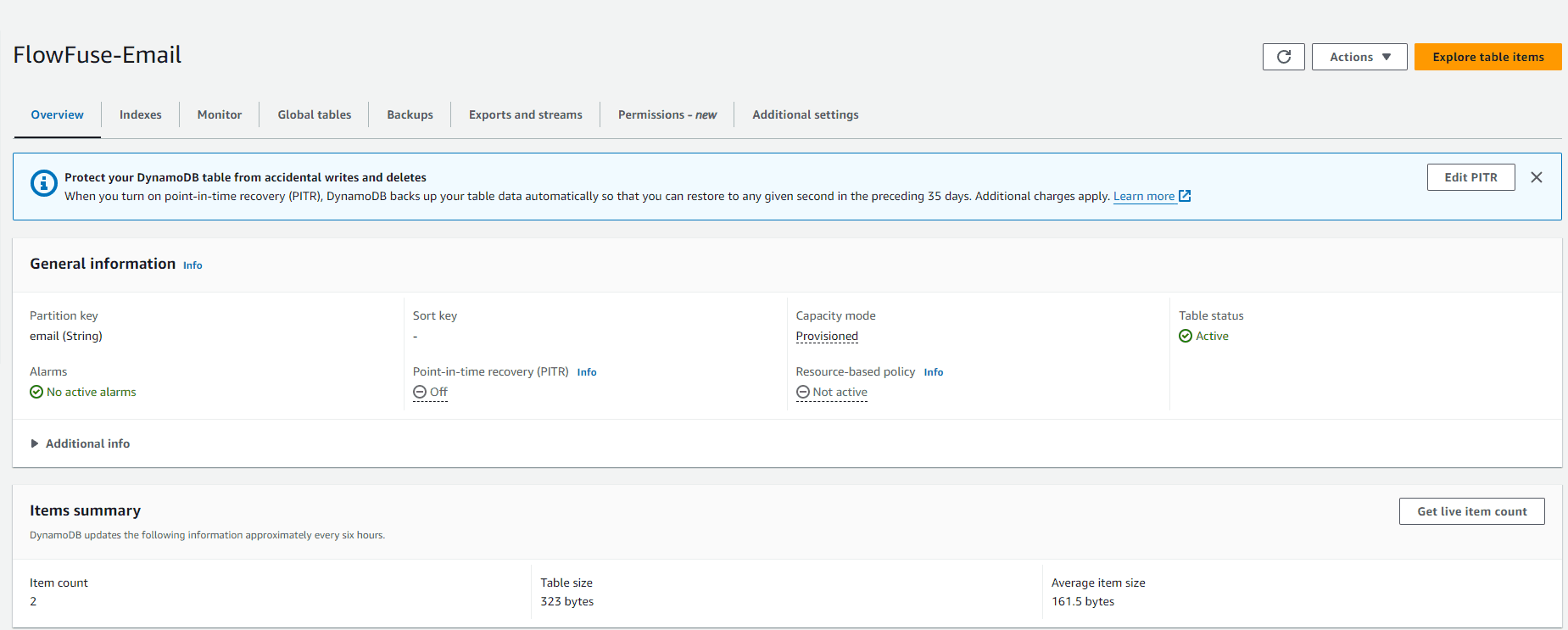
There's no need to create a DynamoDB database, you do need to create a table. Here’s how you can do it:
- Log into the AWS Management Console and navigate to the DynamoDB section.
- Click on Create table.
- For the table name, enter a table name. We will use FlowFuse-Email for this demonstration. For the partition key, use email with type String.
- We will keep the default settings.
- Finally, click on Create to establish your table.
Configuring IAM for DynamoDB
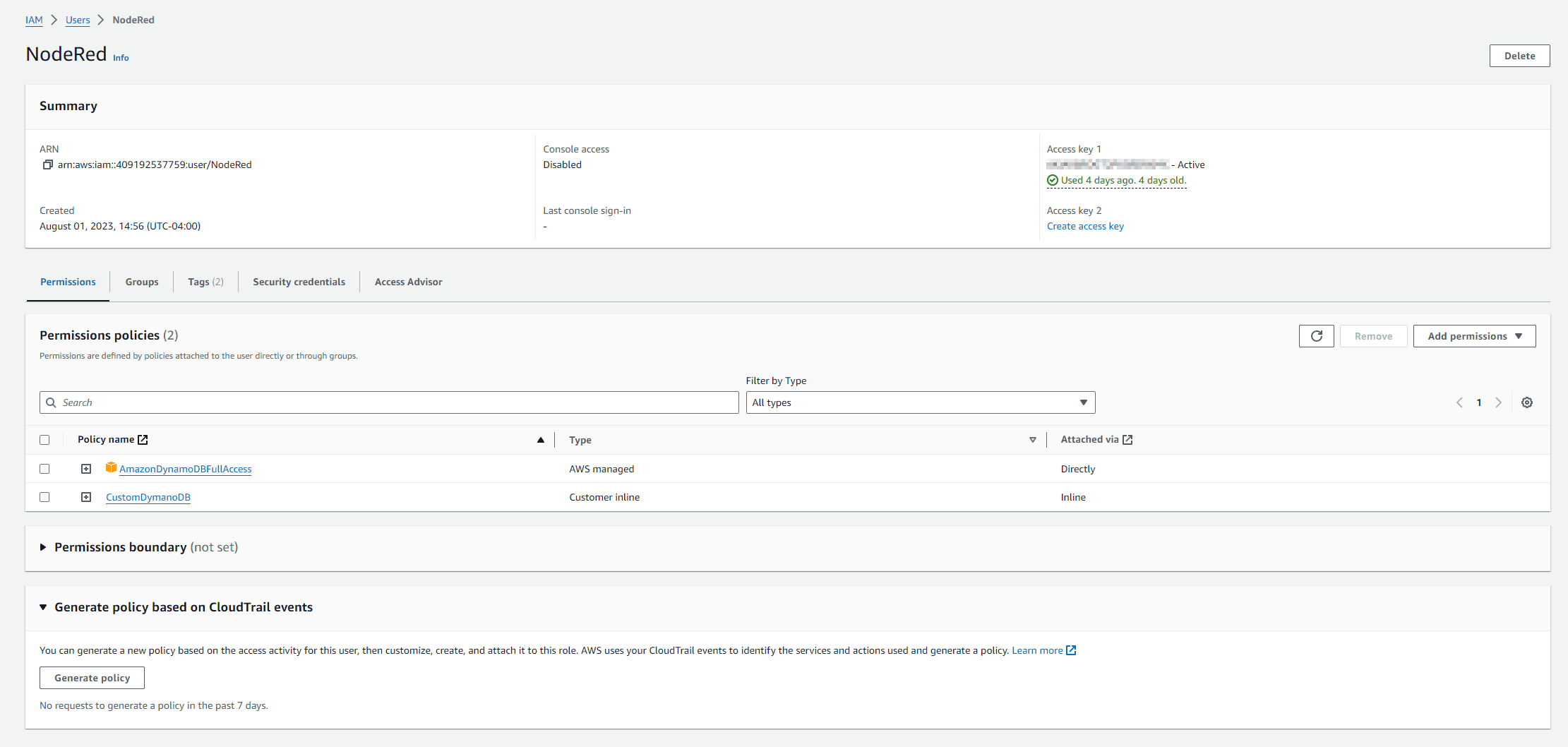
When working with Amazon DynamoDB, it’s crucial to ensure that the right entities have the appropriate permissions to perform actions on your database. This is where AWS Identity and Access Management (IAM) plays an important role. By properly configuring IAM, you ensure that your data is not only secure from unauthorized access but also that the correct roles and users have the precise level of access needed, avoiding any unnecessary permissions that could lead to security risks.
Create a New IAM Role with Necessary Policies:
- Go to IAM in the AWS Console.
- Create a new role and give a name.
- For permission options select Attach Policies Directly.
- Search for the policy AmazonDynamoDBFullAccess and select Next.
- For finer control, customize the policy to restrict access as needed.
- Lastly click Create User.
Generate Access Keys:
- Inside the IAM console select Users.
- Select the newly created user.
- Navigate to Security credentials.
- Navigate to Access Keys and select Create access key.
- Select Application running outside AWS and click Next.
- Give description tag if desired and click Create access Key.
- Save the Access ID and Secret Key for use later.
Working with DynamoDB: Use Case Flows
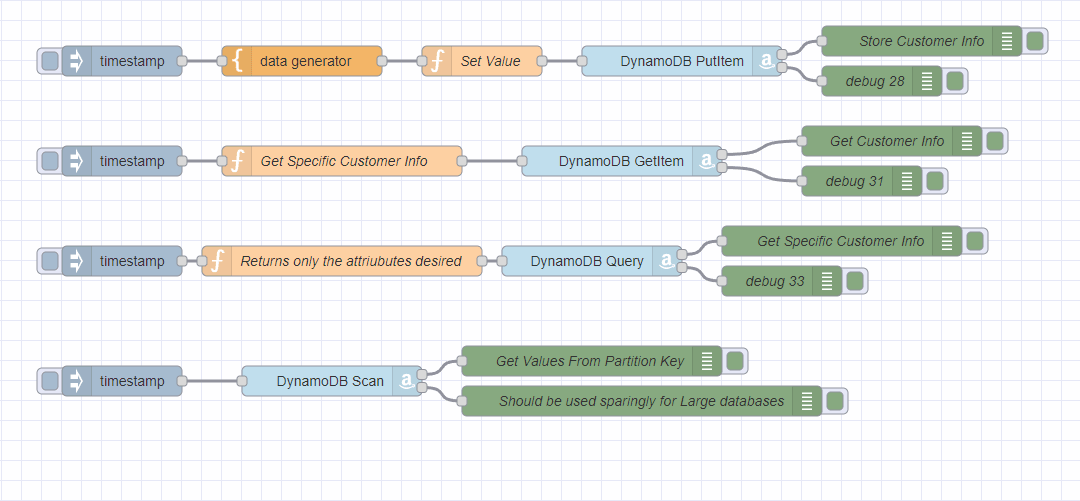
Prerequisites
Please install the following nodes:
Now, let's dive into some practical examples using Node-RED to manage a customer list:
Inserting Data into DynamoDB
This first flow will generate data and send it to DynamoDB via the PutItem operation.
[{"id":"10b0b970739d616f","type":"AWS DynamoDB","z":"37b2bc0d1ebdc616","aws":"","operation":"PutItem","Statements":"","RequestItems":"","TableName":"FlowFuse-Demo","BackupName":"","GlobalTableName":"","ReplicationGroup":"","AttributeDefinitions":"","KeySchema":"","BackupArn":"","Key":"","ExportArn":"","Statement":"","TransactStatements":"","TableArn":"","S3Bucket":"","ResourceArn":"","Item":"","TargetTableName":"","Tags":"","TransactItems":"","TagKeys":"","PointInTimeRecoverySpecification":"","ContributorInsightsAction":"","ReplicaUpdates":"","TimeToLiveSpecification":"","name":"","x":820,"y":240,"wires":[["0157a98fa69fe514"],["dc92470ddaa225bf"]]},{"id":"functionNode","type":"function","z":"37b2bc0d1ebdc616","name":"Set Value","func":"msg.Item = {\n \"source\": { \"S\": msg.source },\n \"time\": { \"N\": String(msg.payload) },\n \"temp\": {\"S\": String(msg.datagen.temp) },\n \"email\": {\"S\": msg.datagen.email},\n \"name\": {\"S\": msg.datagen.name},\n \"work\": {\"S\": msg.datagen.work},\n \"address\": {\"S\": msg.datagen.address},\n \"country\": {\"S\": msg.datagen.country},\n};\n\nmsg.TableName = \"FlowFuse-Email\";\n\nreturn msg;","outputs":1,"timeout":"","noerr":0,"initialize":"","finalize":"","libs":[],"x":620,"y":240,"wires":[["10b0b970739d616f"]]},{"id":"0157a98fa69fe514","type":"debug","z":"37b2bc0d1ebdc616","name":"Store Customer Info","active":true,"tosidebar":true,"console":false,"tostatus":false,"complete":"payload","targetType":"msg","statusVal":"","statusType":"auto","x":1060,"y":220,"wires":[]},{"id":"dc92470ddaa225bf","type":"debug","z":"37b2bc0d1ebdc616","name":"debug 28","active":true,"tosidebar":true,"console":false,"tostatus":false,"complete":"false","statusVal":"","statusType":"auto","x":1020,"y":260,"wires":[]},{"id":"45d46649bae57332","type":"inject","z":"37b2bc0d1ebdc616","name":"","props":[{"p":"payload"},{"p":"source","v":"FF_DEVICE_NAME","vt":"env"}],"repeat":"","crontab":"","once":false,"onceDelay":0.1,"topic":"","payload":"","payloadType":"date","x":260,"y":240,"wires":[["1160ce65b26429f3"]]},{"id":"1160ce65b26429f3","type":"data-generator","z":"37b2bc0d1ebdc616","name":"","field":"datagen","fieldType":"msg","syntax":"json","template":"{\n \"name\": \"{{firstName}} {{lastName}}\",\n \"work\": \"{{company}}\",\n \"email\": \"{{email}}\",\n \"address\": \"{{int 1 100}} {{street}}\",\n \"country\": \"{{country}}\",\n \"temp\": {{float 30 36}}\n}","x":440,"y":240,"wires":[["functionNode"]]}]
- Configure the AWS DyanamoDB node by editing the node.
- Click the pencil to create a new config.
- Give it a name.
- Input the region where your DynamoDB is located. (e.g. us-east-1)
- Input Access ID and Secrete key provide in the step above "Configuring IAM for DynamoDB."
- Click Confirm.
- Trigger the inject node and confirm you don't have any errors.
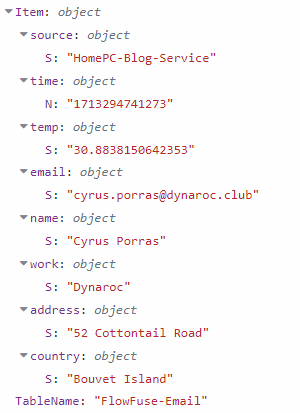
- The Debug node can confirm the data is stored correctly.
- The data structure will look similar to the image below.
Retrieving All Data for a specific Partition Key
The GetItem operation fetches data, which you can then display using debug nodes. To retrieve specific customer information based on their email import this flow:
[{"id":"f7e069b78d2ef5c5","type":"inject","z":"37b2bc0d1ebdc616","name":"","props":[{"p":"payload"},{"p":"topic","vt":"str"}],"repeat":"","crontab":"","once":false,"onceDelay":0.1,"topic":"","payload":"","payloadType":"date","x":260,"y":340,"wires":[["07caf16318aea2f6"]]},{"id":"07caf16318aea2f6","type":"function","z":"37b2bc0d1ebdc616","name":"Get Specific Customer Info","func":"msg = {\n TableName: \"FlowFuse-Email\",\n Key: {\n \"email\": { \"S\": \"florance.shelly@cirpria.xyz\" } //put email you want to search here\n }\n};\nreturn msg;","outputs":1,"timeout":0,"noerr":0,"initialize":"","finalize":"","libs":[],"x":480,"y":340,"wires":[["3485e6cddd28c3eb"]]},{"id":"3485e6cddd28c3eb","type":"AWS DynamoDB","z":"37b2bc0d1ebdc616","aws":"","operation":"GetItem","Statements":"","RequestItems":"","TableName":"","BackupName":"","GlobalTableName":"","ReplicationGroup":"","AttributeDefinitions":"","KeySchema":"","BackupArn":"","Key":"","ExportArn":"","Statement":"","TransactStatements":"","TableArn":"","S3Bucket":"","ResourceArn":"","Item":"","TargetTableName":"","Tags":"","TransactItems":"","TagKeys":"","PointInTimeRecoverySpecification":"","ContributorInsightsAction":"","ReplicaUpdates":"","TimeToLiveSpecification":"","name":"","x":760,"y":340,"wires":[["0c0b39c735d71d77"],["ae673a52c1c7a123"]]},{"id":"0c0b39c735d71d77","type":"debug","z":"37b2bc0d1ebdc616","name":"debug 30","active":true,"tosidebar":true,"console":false,"tostatus":false,"complete":"false","statusVal":"","statusType":"auto","x":1000,"y":320,"wires":[]},{"id":"ae673a52c1c7a123","type":"debug","z":"37b2bc0d1ebdc616","name":"debug 31","active":true,"tosidebar":true,"console":false,"tostatus":false,"complete":"false","statusVal":"","statusType":"auto","x":1000,"y":360,"wires":[]}]
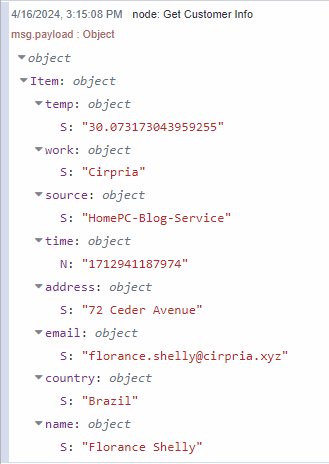
The function node specifies the TableName and Partition key to search against.
Querying Data
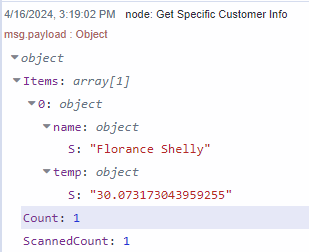
When you need to find items under specific criteria, set up your query with partition keys and conditions. The Query operation allows you to efficiently retrieve data without scanning the entire contents of a particular partition key. If a key has significant about of data, but only need one particular value. This would then be the ideal path.
[{"id":"99a876a56a78ae25","type":"inject","z":"37b2bc0d1ebdc616","name":"","props":[{"p":"payload"},{"p":"topic","vt":"str"}],"repeat":"","crontab":"","once":false,"onceDelay":0.1,"topic":"","payload":"","payloadType":"date","x":260,"y":420,"wires":[["d59f213bc3f6712a"]]},{"id":"d59f213bc3f6712a","type":"function","z":"37b2bc0d1ebdc616","name":"Returns only the attriubutes desired","func":"msg.TableName = \"FlowFuse-Email\";\nmsg.KeyConditionExpression = \"email = :email\";\nmsg.ExpressionAttributeValues = {\n \":email\": { \"S\": \"florance.shelly@cirpria.xyz\" }\n};\nmsg.ProjectionExpression = \"#n, #t\";\nmsg.ExpressionAttributeNames = {\n \"#t\": \"temp\",\n \"#n\": \"name\"\n} // Only retrieve these attributes\n\nreturn msg;\n","outputs":1,"timeout":0,"noerr":0,"initialize":"","finalize":"","libs":[],"x":480,"y":420,"wires":[["e178ffb9a87226a5"]]},{"id":"e178ffb9a87226a5","type":"AWS DynamoDB","z":"37b2bc0d1ebdc616","aws":"","operation":"Query","Statements":"","RequestItems":"","TableName":"","BackupName":"","GlobalTableName":"","ReplicationGroup":"","AttributeDefinitions":"","KeySchema":"","BackupArn":"","Key":"","ExportArn":"","Statement":"","TransactStatements":"","TableArn":"","S3Bucket":"","ResourceArn":"","Item":"","TargetTableName":"","Tags":"","TransactItems":"","TagKeys":"","PointInTimeRecoverySpecification":"","ContributorInsightsAction":"","ReplicaUpdates":"","TimeToLiveSpecification":"","name":"","x":730,"y":420,"wires":[["b2e6d9d9dcf9dcd3"],["b2595472f1dc6570"]]},{"id":"b2e6d9d9dcf9dcd3","type":"debug","z":"37b2bc0d1ebdc616","name":"debug 32","active":true,"tosidebar":true,"console":false,"tostatus":false,"complete":"false","statusVal":"","statusType":"auto","x":920,"y":400,"wires":[]},{"id":"b2595472f1dc6570","type":"debug","z":"37b2bc0d1ebdc616","name":"debug 33","active":true,"tosidebar":true,"console":false,"tostatus":false,"complete":"false","statusVal":"","statusType":"auto","x":920,"y":440,"wires":[]}]
In this example we are retrieving only name and temp from the matching partition key match.
Scanning Data
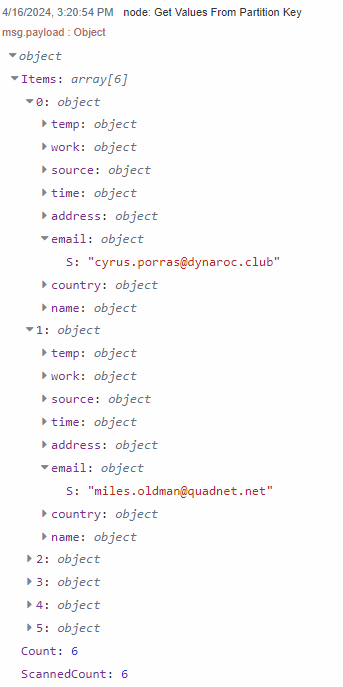
While scanning is available, it should be used sparingly due to its high demand on resources, especially in large databases. Use it when necessary prioritize using query for regular operations.
[{"id":"671cf37c1ae941d2","type":"inject","z":"37b2bc0d1ebdc616","name":"","props":[{"p":"payload"},{"p":"TableName","v":"FlowFuse-Email","vt":"str"}],"repeat":"","crontab":"","once":false,"onceDelay":0.1,"topic":"","payload":"","payloadType":"date","x":260,"y":540,"wires":[["8cb14f9530eeb524"]]},{"id":"8cb14f9530eeb524","type":"AWS DynamoDB","z":"37b2bc0d1ebdc616","aws":"","operation":"Scan","Statements":"","RequestItems":"","TableName":"","BackupName":"","GlobalTableName":"","ReplicationGroup":"","AttributeDefinitions":"","KeySchema":"","BackupArn":"","Key":"","ExportArn":"","Statement":"","TransactStatements":"","TableArn":"","S3Bucket":"","ResourceArn":"","Item":"","TargetTableName":"","Tags":"","TransactItems":"","TagKeys":"","PointInTimeRecoverySpecification":"","ContributorInsightsAction":"","ReplicaUpdates":"","TimeToLiveSpecification":"","name":"","x":470,"y":540,"wires":[["86e3a35428218d91"],["5c6e85699cc783fc"]]},{"id":"86e3a35428218d91","type":"debug","z":"37b2bc0d1ebdc616","name":"Get Values From Partition Key","active":true,"tosidebar":true,"console":false,"tostatus":false,"complete":"payload","targetType":"msg","statusVal":"","statusType":"auto","x":730,"y":520,"wires":[]},{"id":"5c6e85699cc783fc","type":"debug","z":"37b2bc0d1ebdc616","name":"Should be used sparingly for Large databases","active":true,"tosidebar":true,"console":false,"tostatus":false,"complete":"payload","targetType":"msg","statusVal":"","statusType":"auto","x":780,"y":560,"wires":[]}]
Full Flow
[{"id":"10b0b970739d616f","type":"AWS DynamoDB","z":"37b2bc0d1ebdc616","aws":"75ba91a6ba62cece","operation":"PutItem","Statements":"","RequestItems":"","TableName":"FlowFuse-Email","BackupName":"","GlobalTableName":"","ReplicationGroup":"","AttributeDefinitions":"","KeySchema":"","BackupArn":"","Key":"","ExportArn":"","Statement":"","TransactStatements":"","TableArn":"","S3Bucket":"","ResourceArn":"","Item":"","TargetTableName":"","Tags":"","TransactItems":"","TagKeys":"","PointInTimeRecoverySpecification":"","ContributorInsightsAction":"","ReplicaUpdates":"","TimeToLiveSpecification":"","name":"","x":820,"y":220,"wires":[["0157a98fa69fe514"],["dc92470ddaa225bf"]]},{"id":"functionNode","type":"function","z":"37b2bc0d1ebdc616","name":"Set Value","func":"msg.Item = {\n \"source\": { \"S\": msg.source },\n \"time\": { \"N\": String(msg.payload) },\n \"temp\": {\"S\": String(msg.datagen.temp) },\n \"email\": {\"S\": msg.datagen.email},\n \"name\": {\"S\": msg.datagen.name},\n \"work\": {\"S\": msg.datagen.work},\n \"address\": {\"S\": msg.datagen.address},\n \"country\": {\"S\": msg.datagen.country},\n};\n\nmsg.TableName = \"FlowFuse-Email\";\n\nreturn msg;","outputs":1,"timeout":"","noerr":0,"initialize":"","finalize":"","libs":[],"x":620,"y":220,"wires":[["10b0b970739d616f"]]},{"id":"0157a98fa69fe514","type":"debug","z":"37b2bc0d1ebdc616","name":"Store Customer Info","active":true,"tosidebar":true,"console":false,"tostatus":false,"complete":"payload","targetType":"msg","statusVal":"","statusType":"auto","x":1060,"y":200,"wires":[]},{"id":"dc92470ddaa225bf","type":"debug","z":"37b2bc0d1ebdc616","name":"debug 28","active":true,"tosidebar":true,"console":false,"tostatus":false,"complete":"false","statusVal":"","statusType":"auto","x":1020,"y":240,"wires":[]},{"id":"45d46649bae57332","type":"inject","z":"37b2bc0d1ebdc616","name":"","props":[{"p":"payload"},{"p":"source","v":"FF_DEVICE_NAME","vt":"env"}],"repeat":"","crontab":"","once":false,"onceDelay":0.1,"topic":"","payload":"","payloadType":"date","x":260,"y":220,"wires":[["1160ce65b26429f3"]]},{"id":"f7e069b78d2ef5c5","type":"inject","z":"37b2bc0d1ebdc616","name":"","props":[{"p":"payload"},{"p":"topic","vt":"str"}],"repeat":"","crontab":"","once":false,"onceDelay":0.1,"topic":"","payload":"","payloadType":"date","x":260,"y":320,"wires":[["07caf16318aea2f6"]]},{"id":"07caf16318aea2f6","type":"function","z":"37b2bc0d1ebdc616","name":"Get Specific Customer Info","func":"msg = {\n TableName: \"FlowFuse-Email\",\n Key: {\n \"email\": { \"S\": \"florance.shelly@cirpria.xyz\" } //put email you want to search here\n }\n};\nreturn msg;","outputs":1,"timeout":0,"noerr":0,"initialize":"","finalize":"","libs":[],"x":480,"y":320,"wires":[["3485e6cddd28c3eb"]]},{"id":"3485e6cddd28c3eb","type":"AWS DynamoDB","z":"37b2bc0d1ebdc616","aws":"75ba91a6ba62cece","operation":"GetItem","Statements":"","RequestItems":"","TableName":"","BackupName":"","GlobalTableName":"","ReplicationGroup":"","AttributeDefinitions":"","KeySchema":"","BackupArn":"","Key":"","ExportArn":"","Statement":"","TransactStatements":"","TableArn":"","S3Bucket":"","ResourceArn":"","Item":"","TargetTableName":"","Tags":"","TransactItems":"","TagKeys":"","PointInTimeRecoverySpecification":"","ContributorInsightsAction":"","ReplicaUpdates":"","TimeToLiveSpecification":"","name":"","x":760,"y":320,"wires":[["0c0b39c735d71d77"],["ae673a52c1c7a123"]]},{"id":"0c0b39c735d71d77","type":"debug","z":"37b2bc0d1ebdc616","name":"Get Customer Info","active":true,"tosidebar":true,"console":false,"tostatus":false,"complete":"payload","targetType":"msg","statusVal":"","statusType":"auto","x":1030,"y":300,"wires":[]},{"id":"ae673a52c1c7a123","type":"debug","z":"37b2bc0d1ebdc616","name":"debug 31","active":true,"tosidebar":true,"console":false,"tostatus":false,"complete":"false","statusVal":"","statusType":"auto","x":1000,"y":340,"wires":[]},{"id":"99a876a56a78ae25","type":"inject","z":"37b2bc0d1ebdc616","name":"","props":[{"p":"payload"},{"p":"topic","vt":"str"}],"repeat":"","crontab":"","once":false,"onceDelay":0.1,"topic":"","payload":"","payloadType":"date","x":260,"y":420,"wires":[["d59f213bc3f6712a"]]},{"id":"d59f213bc3f6712a","type":"function","z":"37b2bc0d1ebdc616","name":"Returns only the attriubutes desired","func":"msg.TableName = \"FlowFuse-Email\";\nmsg.KeyConditionExpression = \"email = :email\";\nmsg.ExpressionAttributeValues = {\n \":email\": { \"S\": \"florance.shelly@cirpria.xyz\" }\n};\nmsg.ProjectionExpression = \"#n, #t\";\nmsg.ExpressionAttributeNames = {\n \"#t\": \"temp\",\n \"#n\": \"name\"\n} // Only retrieve these attributes\n\nreturn msg;\n","outputs":1,"timeout":0,"noerr":0,"initialize":"","finalize":"","libs":[],"x":480,"y":420,"wires":[["e178ffb9a87226a5"]]},{"id":"e178ffb9a87226a5","type":"AWS DynamoDB","z":"37b2bc0d1ebdc616","aws":"75ba91a6ba62cece","operation":"Query","Statements":"","RequestItems":"","TableName":"","BackupName":"","GlobalTableName":"","ReplicationGroup":"","AttributeDefinitions":"","KeySchema":"","BackupArn":"","Key":"","ExportArn":"","Statement":"","TransactStatements":"","TableArn":"","S3Bucket":"","ResourceArn":"","Item":"","TargetTableName":"","Tags":"","TransactItems":"","TagKeys":"","PointInTimeRecoverySpecification":"","ContributorInsightsAction":"","ReplicaUpdates":"","TimeToLiveSpecification":"","name":"","x":730,"y":420,"wires":[["b2e6d9d9dcf9dcd3"],["b2595472f1dc6570"]]},{"id":"b2e6d9d9dcf9dcd3","type":"debug","z":"37b2bc0d1ebdc616","name":"Get Specific Customer Info","active":true,"tosidebar":true,"console":false,"tostatus":false,"complete":"payload","targetType":"msg","statusVal":"","statusType":"auto","x":980,"y":400,"wires":[]},{"id":"b2595472f1dc6570","type":"debug","z":"37b2bc0d1ebdc616","name":"debug 33","active":true,"tosidebar":true,"console":false,"tostatus":false,"complete":"false","statusVal":"","statusType":"auto","x":920,"y":440,"wires":[]},{"id":"1160ce65b26429f3","type":"data-generator","z":"37b2bc0d1ebdc616","name":"","field":"datagen","fieldType":"msg","syntax":"json","template":"{\n \"name\": \"{{firstName}} {{lastName}}\",\n \"work\": \"{{company}}\",\n \"email\": \"{{email}}\",\n \"address\": \"{{int 1 100}} {{street}}\",\n \"country\": \"{{country}}\",\n \"temp\": {{float 30 36}}\n}","x":440,"y":220,"wires":[["functionNode"]]},{"id":"671cf37c1ae941d2","type":"inject","z":"37b2bc0d1ebdc616","name":"","props":[{"p":"payload"},{"p":"TableName","v":"FlowFuse-Email","vt":"str"}],"repeat":"","crontab":"","once":false,"onceDelay":0.1,"topic":"","payload":"","payloadType":"date","x":260,"y":540,"wires":[["8cb14f9530eeb524"]]},{"id":"8cb14f9530eeb524","type":"AWS DynamoDB","z":"37b2bc0d1ebdc616","aws":"75ba91a6ba62cece","operation":"Scan","Statements":"","RequestItems":"","TableName":"","BackupName":"","GlobalTableName":"","ReplicationGroup":"","AttributeDefinitions":"","KeySchema":"","BackupArn":"","Key":"","ExportArn":"","Statement":"","TransactStatements":"","TableArn":"","S3Bucket":"","ResourceArn":"","Item":"","TargetTableName":"","Tags":"","TransactItems":"","TagKeys":"","PointInTimeRecoverySpecification":"","ContributorInsightsAction":"","ReplicaUpdates":"","TimeToLiveSpecification":"","name":"","x":470,"y":540,"wires":[["86e3a35428218d91"],["5c6e85699cc783fc"]]},{"id":"86e3a35428218d91","type":"debug","z":"37b2bc0d1ebdc616","name":"Get Values From Partition Key","active":true,"tosidebar":true,"console":false,"tostatus":false,"complete":"payload","targetType":"msg","statusVal":"","statusType":"auto","x":730,"y":520,"wires":[]},{"id":"5c6e85699cc783fc","type":"debug","z":"37b2bc0d1ebdc616","name":"Should be used sparingly for Large databases","active":true,"tosidebar":true,"console":false,"tostatus":false,"complete":"payload","targetType":"msg","statusVal":"","statusType":"auto","x":780,"y":560,"wires":[]},{"id":"75ba91a6ba62cece","type":"amazon config","name":"AWS-gdziuba","region":"us-east-1","proxyRequired":false,"proxy":""}]