Expert on Your Team Overview
Your team's home page now opens with FlowFuse Expert. Ask a question right from the overview and the answer appears in place.
Previously, you had to find the right page or open the Expert side panel before you could ask anything. Now the Expert is the first thing you see when you open your team.
Not sure where to start? Pick one of the suggested prompts under the composer. Everything the overview showed before sits just below it: your hosted instances, your remote instances, and your team's recent activity.
A conversation you start here follows you. Navigate away and it carries on in the Expert panel, right where you left off.
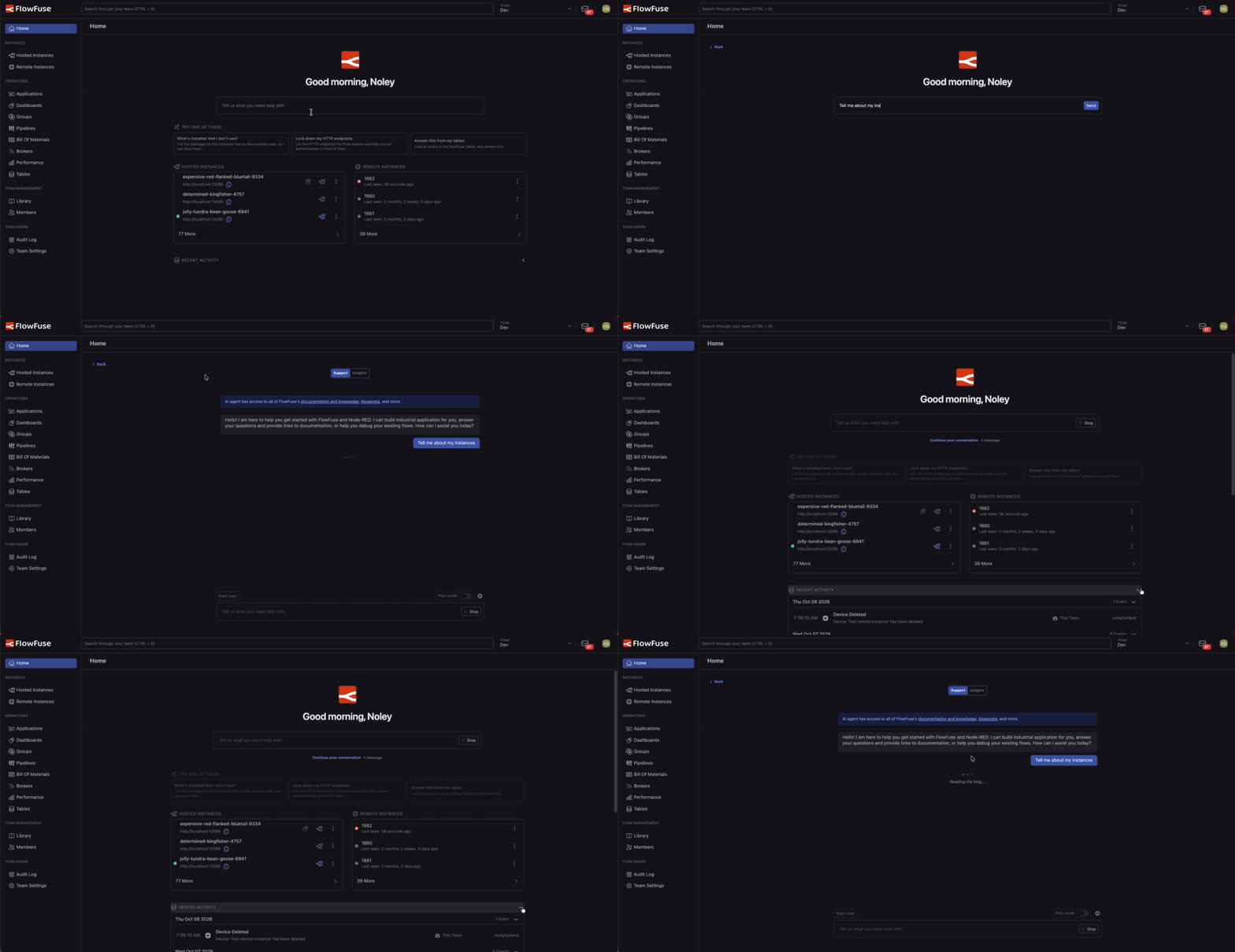 Asking a question from the team overview, heading back to the overview, then reopening the conversation.
This feature is available to all FlowFuse teams with AI Features enabled on FlowFuse Cloud now and Self Hosted from FlowFuse v3.2.
Written By:
Published on:
Related GitHub Issues
Recent Updates:
- Introducing Remote Agent Plugin
- AI Improvements in FlowFuse
- Vue and Vuetify Editing for Templates
- Tool Permissions for MCP Agents
- Siemens S7 Certified Nodes