Multiple Groups per Tab in Dashboard
You can now put several groups in one tab on a Dashboard page that uses the Tabs layout.
Previously, every group became its own tab. A page with a compose form, its attachments, and a preview needed three separate tabs, or everything stacked on one long page. Now those groups can share a "Compose" tab and sit side by side, just like a Grid page.
To get started:
- Open a page that uses the Tabs layout and add your tabs to the new Tabs list.
- Open each group and pick its Tab.
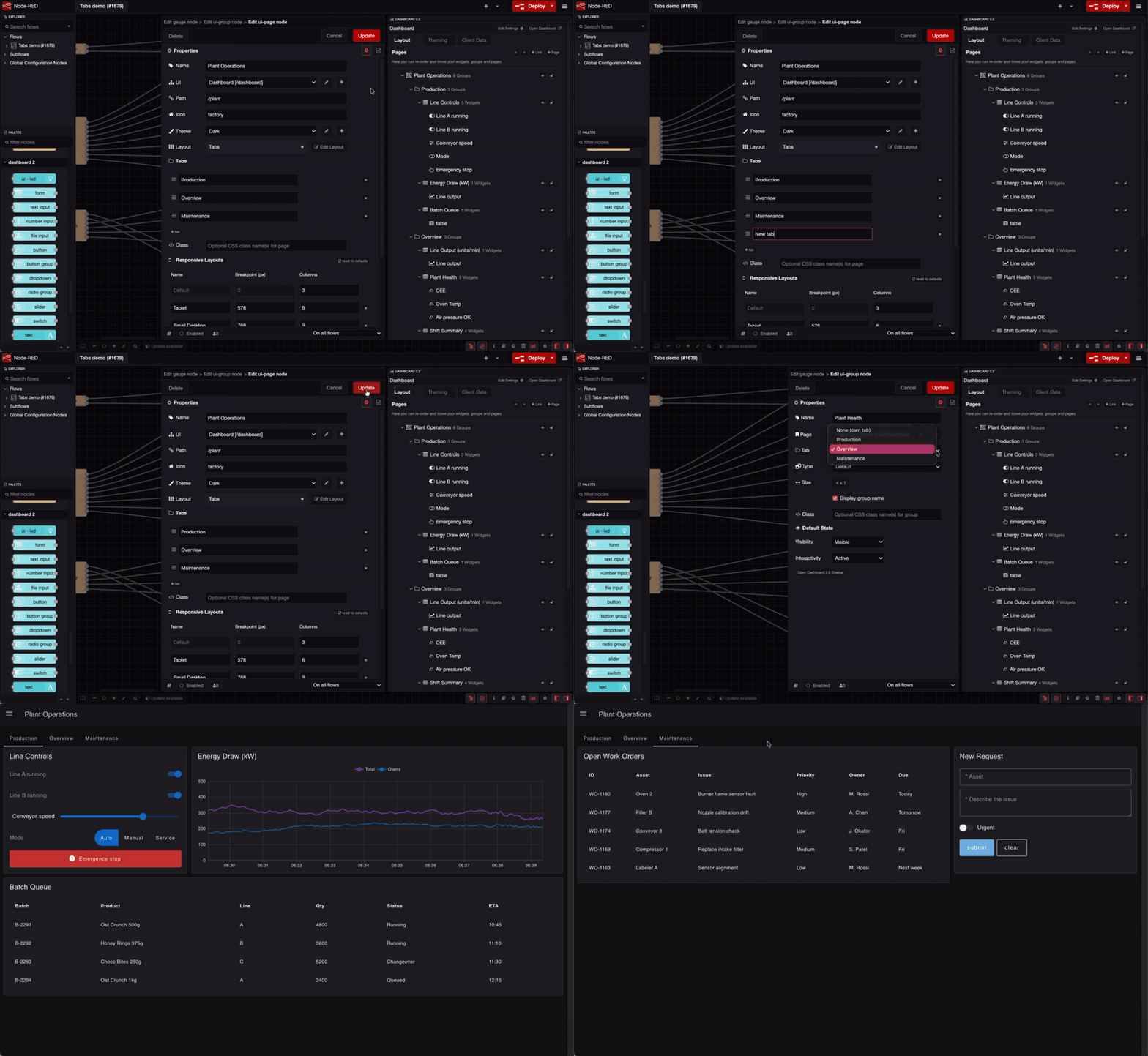 Adding tabs in the page settings, assigning a group to a tab, then flipping through tabs on the Dashboard, each holding several groups.
You can also drag groups between tabs, and reorder tabs, from the Layout view in the Dashboard sidebar.
Existing Tabs pages look exactly the same until you add tabs.
This feature is available to all FlowFuse Dashboard users from v1.33.0, on FlowFuse Cloud and Self Hosted.
Written By:
Published on:
Related GitHub Issues
Recent Updates:
- Introducing Remote Agent Plugin
- AI Improvements in FlowFuse
- Vue and Vuetify Editing for Templates
- Expert on Your Team Overview
- Tool Permissions for MCP Agents