node-red-contrib-awtrix-epl-live
awtrix live football
EPL Match Tracker
Basic Usage
Dependencies
Before wiring output 2 or output 3 to an AWTRIX mqtt out node, pre-load
any icons to your Awtrix display(s) (see Configuration below).
default is no icon
Configuration
Double-click the node and set:
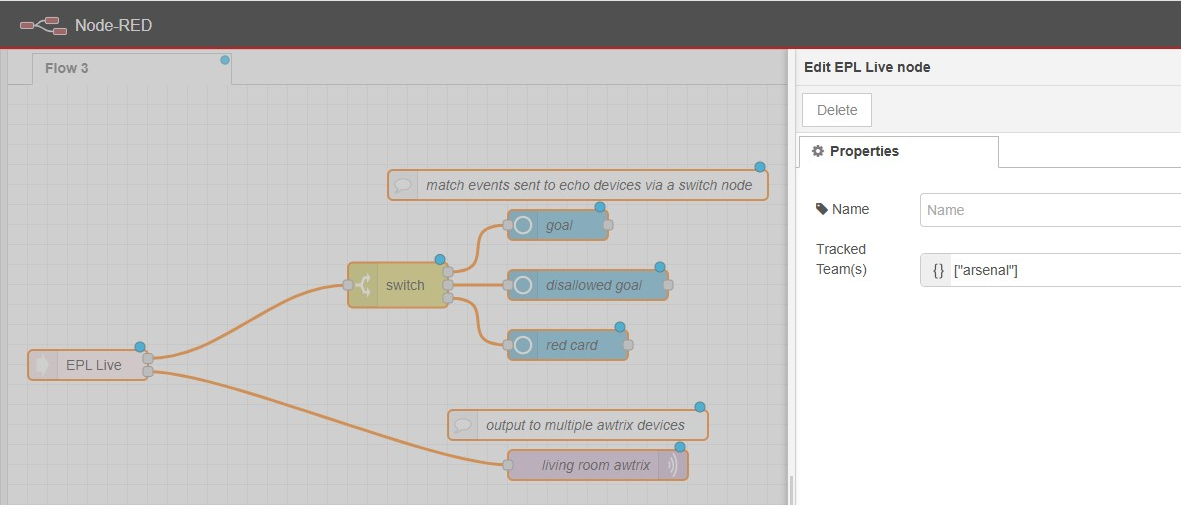
- Tracked teams A JSON array of team names (case-insensitive).
["Liverpool", "Manchester City", "Crystal Palace", "Aston Villa"]
Team names have been relaxed and more common names are also accepted
["lfc", "man city", "palace", "villa"]
-
Additional competitions
True / False in the dialog options will include or exclude team tracking for UEFA competitions.Champions League.Europa League.Europa Conference League.
-
Goals icon (
goalsIcon) - icon ID used for goal, penalty goal, own goal, and disallowed goal notifications.0(default) means no icon is sent. -
Red card icon (
redCardIcon) - icon ID used for red card notifications.0(default) means no icon is sent. -
Full time icon (
fullTimeIcon) - icon ID used for full time notifications.0(default) means no icon is sent. -
Recommended LaMetric Icon Numbers
Icon ID Used for 2965goal / penalty goal / own goal, disallowed goal & full time 43844red card -
Minimum brightness
Your Awtrix device brightness has a direct effect on how readable certain text colours are and darker palette colours can be difficult to view on the display.
Theminimum brightnessdialogue setting is a 'perceived colour' brightness value used to determine if a team colour will be readable on your Awtrix display.
All team name colours are evaluated against this value, primary and alternate colours are tested in order, if they fall below this threshold and fail the test the team name colour falls back to '#FFFFFF'.
The default value for this setting is30. If you find text colours difficult to read or too many team names displayed in white, increase this number.
Outputs
This node has three outputs, wire your own downstream nodes to these
Output pin #1 - Payload event type, wire to anything you want (eg. Alexa/Google notification)
msg.payload is one of: "goal", "disallowed goal", "red card",
or "full time". Penalties and own goals are also reported as "goal"
on this output. The distinction between goal events is only reported
by pin #2 & pin #3.
Wire a switch node off this output to route each event type to your
own desired trigger.
Here is an Alexa Ready audio clip you can use for "GOAL" events to get you started
"<audio src='https://nr-alexa-sounds.s3.eu-west-2.amazonaws.com/goal.mp3'/>"
Output pin #2 - AWTRIX 3 payload
msg.payload is a ready-to-send 2 part AWTRIX 3 notification object set to fire with
pin #1 and carries the event plus a followup detail (incl. score, player, team names).
Wire this pin straight to one or more mqtt out nodes pointed at your AWTRIX 3 device(s).
Output pin #3 - AWTRIX NG payload
msg.payload The same as pin #2 but formatted for AWTRIX-NG devices.
internally
-
Tracked team colours
Primary & secondary team colours are assessed independently.
Home team first to determine if the primary colour is deemed too dark or not viable for AWTRIX (see Minimum brightness).
Away team colours are assessed in the same manner and checked against the home team resolved colour to avoid the two clashing. -
Node Status
The node will show any upcoming matches for tracked teams only:- "nothing upcoming" - none of your tracked teams have any immediate matches.
- "next match xxxx-xx-xx" - date of the next match from your tracked teams list.
- "kick off shortly" - a match is about to begin.
- "live - in play" - match underway and actively polling for live data.
Known limitations
Currently team names are ONLY resolved against the Premier League. Non EPL teams cannot currently be added to Tracked Teams by name.