node-red-contrib-anker-solix
Node-RED node to read real-time data and energy statistics from Anker SOLIX Solar & Energy Storage Systems (Solarbank 2/3, Solarbank Max, Power Dock AE100, Smart Meter) for OpenCCU, MQTT, Home Assistant, ioBroker, InfluxDB and KNX/Loxone.
node-red-contrib-anker-solix
🌐 Language / Sprache: 🇬🇧 English Overview (Full English Docs) | 🇩🇪 Kurzübersicht Deutsch (Vollständige deutsche Anleitung)
🇬🇧 Overview (English)
Node-RED node to read real-time data (W, %, °C) and energy statistics (kWh) from Anker SOLIX Solar & Energy Storage Systems (Solarbank 2 E1600 Pro/Plus, Solarbank 3 E2700 Pro, Solarbank Max AE111, Solarbank Max AC A17E2/B17E2, Power Dock AE100, and Anker Smart Meters) via the Anker EU Cloud.
- Universal Output 1 (
{ topic, payload }): Sends delta-filtered values (with a 300-second heartbeat for flatline-free charts in CCU-Historian / InfluxDB) directly to OpenCCU / HomeMatic (ccu-sysvar), MQTT Brokers (mqtt outfor Home Assistant / ioBroker), InfluxDB, or KNX / Loxone. - Raw JSON Output 2 (
scen_info&energy_analysis): Provides full API payloads for custom processing, debugging, or direct database logging. - Smart Hardware Auto-Detection & Battery Protection: Automatically detects Power Dock (
AE100), Anker Smart Meters (A17X7,A17X8,AE1X0,AE1R0,SHEM3), and AC-coupled home storage (AE111,A17E2,B17E2) for continuous 24/7 real-time updates, while keeping standalone solarbanks in battery-safe sleep mode at night. - Account Recommendation: Using a shared secondary Anker account is recommended for read-only data monitoring (maximum security and clean separation); the primary owner account is only required starting with
v1.1.0when sending write/control commands (Anker now supports parallel logins from the smartphone app and Node-RED simultaneously). - EU Cloud Support: Works with all European Anker SOLIX accounts (
://anker.com).
Visual Quick Start
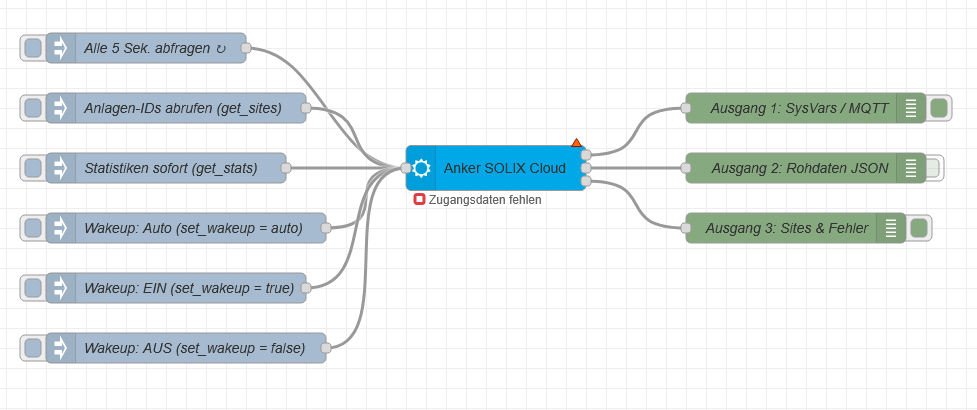
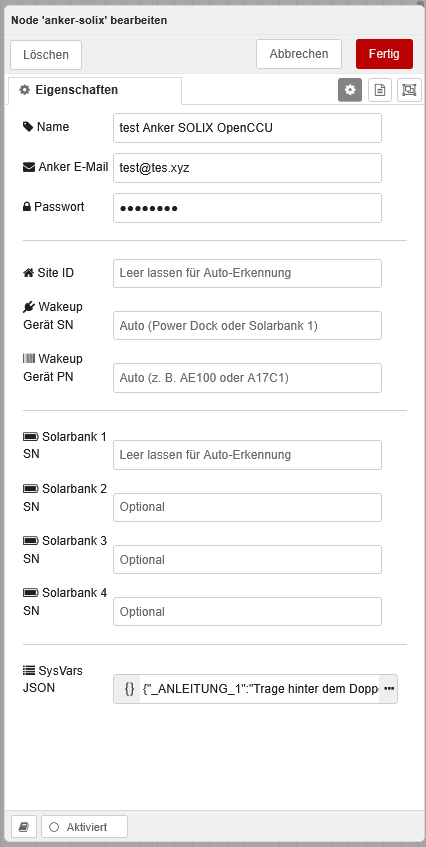
👉 Read the full English Documentation (Installation, SysVars, MQTT & Commands)
Changelog
v1.0.26:- Extended
energy_analysisstatistics queries across"solar_production","home_usage", and"grid"so Power Dock (AE100) and Smart Meter systems reliably report grid import (STAT_GES_*_NETZ), home usage (STAT_GES_*_HAUS), and export (STAT_GES_*_EINSP) inkWh. - Fixed weekly statistics start date calculation (Monday of the current week) and added raw
energy_analysisJSON output on Output 2 plusmsg.topic = "get_stats"on-demand refresh. - Updated documentation (
README.md,README.de.md,README.en.md) withkWhunits, status badges, bilingual quick navigation, and updated account recommendations.
- Extended
v1.0.25:- Improved 24/7 MQTT wake-up (
cmd: 17,qos: 1, officialclientId, REST app pingsget_site_homepage&get_site_detail, 90-second stall re-trigger, and per-device wake-up lock). - Added 300-second heartbeat in
emitSysVarto prevent spline wave interpolation artifacts in CCU-Historian during constant phases. - Made
get_sitesnon-blocking during active polling.
- Improved 24/7 MQTT wake-up (
v1.0.20–v1.0.24:- Refined session token caching across multiple node instances sharing one account and stabilized MQTT reconnect handling.
v1.0.19:- Added explicit hardware support for Anker Smart Meter 2nd Gen (1-phase,
AE1X0) and AC-coupled home storage systems (Solarbank MaxAE111, Solarbank Max ACA17E2/B17E2). - Prioritized manually entered Wakeup Device SN/PN over automatic detection.
- Increased login protection cooldown to 5 minutes on wrong password errors (
26108) to prevent account lockouts (10019). - Added structured section headers (
_ANLEITUNG_1,_BEREICH_...) to the default SysVars JSON template and example flow. - Introduced multilingual documentation (
README.md,README.en.md,README.de.md).
- Added explicit hardware support for Anker Smart Meter 2nd Gen (1-phase,
v1.0.18: Implemented binary MQTTpull_to_refresh(cmd: 17) with randomized jitter (3.5–7 min) and automatic battery protection for standalone solarbanks.v1.0.15: Addedset_wakeupruntime command (true/false/"auto") andget_sitesmulti-site discovery.
Planned Roadmap (Unbinding / Subject to Change)
v1.1.0:- Central account configuration node (
anker-solix-config) with dropdown selection and server region selector (EU/US-Global) for worldwide compatibility. - Automatic multi-instance start offset (
0–1,500 ms) when triggering multiple nodes from a single inject. - Write commands via safe Read-Modify-Write (
set_mode,set_power,set_min_soc,set_grid_export– requires primary owner account).
- Central account configuration node (
v2.0.x:- Extended support for the wider Anker SOLIX ecosystem: V1 Smart EV Charger (
A5191), SOLIX X1 Home Energy Storage, and portable power stations / backup units (pps_info).
- Extended support for the wider Anker SOLIX ecosystem: V1 Smart EV Charger (
Legal Notice, Transparency & Disclaimer (English)
- Unofficial Community Project: This Node-RED package (
node-red-contrib-anker-solix) is an independent open-source community project and is not affiliated with, endorsed, or supported by Anker Innovations Limited or Anker SOLIX. All product names and trademarks belong to their respective owners. - Transparency & Development: Conception, architecture, practical testing, and maintenance are provided by the project author; code generation was assisted by AI (Google Gemini).
- Use at Your Own Risk: Provided under the MIT License without warranty of any kind. Using the unofficial cloud interface is at your own risk. The author assumes no liability for temporary account restrictions, data loss, battery discharge, or damages resulting from the use of this node or changes to the Anker API.
- Privacy: Email address and password are stored exclusively locally in Node-RED's encrypted credential storage (
flows_cred.json) and transmitted only to official Anker EU servers.
🇩🇪 Kurzübersicht (Deutsch)
Node-RED-Baustein zum Auslesen von Echtzeit- (W, %, °C) und Statistikdaten (kWh) für Anker SOLIX Solar- & Speichersysteme (Solarbank 2 E1600 Pro/Plus, Solarbank 3 E2700 Pro, Solarbank Max AE111, Solarbank Max AC A17E2/B17E2, Power Dock AE100 sowie Anker Smart Meter) über die Anker EU-Cloud.
- Universeller Ausgang 1 (
{ topic, payload }): Sendet Werte bei Änderung (sowie alle 300 Sekunden als Stützpunkt gegen Spline-Wellen in CCU-Historian / InfluxDB) direkt an OpenCCU / HomeMatic (ccu-sysvar), MQTT-Broker (mqtt outfür Home Assistant / ioBroker), InfluxDB oder KNX / Loxone. - Rohdaten-Ausgang 2 (
scen_info&energy_analysis): Liefert die vollständigen JSON-Antworten der API für eigene Auswertungen oder zur Diagnose. - Intelligente Hardware-Erkennung & Akkuschutz: Erkennt Power Dock (
AE100), Anker Smart Meter (A17X7,A17X8,AE1X0,AE1R0,SHEM3) und 230V-Heimspeicher (AE111,A17E2,B17E2) automatisch für lückenlose 24/7-Echtzeitdaten, während reine Solarbank-Anlagen nachts im akkuschonenden Schlafmodus bleiben. - Konten-Empfehlung: Ein geteiltes Zweitkonto wird für das reine Auslesen von Live- und Statistikdaten empfohlen (maximale Sicherheit und saubere Trennung); das Hauptkonto (Eigentümer) ist erst ab
v1.1.0nötig, wenn Schreibbefehle / Steuerungen an die Anlage gesendet werden sollen (Anker erlaubt inzwischen parallele Logins von App und Node-RED gleichzeitig). - EU-Cloud-Unterstützung: Funktioniert mit allen europäischen Anker-SOLIX-Konten (
://anker.com).
👉 Zur vollständigen deutschen Anleitung (Installation, Systemvariablen, MQTT & Steuerbefehle)
Rechtliche Hinweise, Transparenz & Haftungsausschluss (Deutsch)
- Unabhängiges Community-Projekt: Dieses Node-RED-Paket (
node-red-contrib-anker-solix) ist ein privates Open-Source-Projekt und steht in keiner Verbindung zu Anker Innovations Limited oder Anker SOLIX. Alle genannten Marken- und Produktnamen sind Eigentum der jeweiligen Rechteinhaber. - Transparenz & Entstehung: Konzeption, Architektur, Praxistests und Pflege stammen vom Projektautor; die Code-Erstellung erfolgte mit KI-Unterstützung (Google Gemini).
- Nutzung auf eigene Gefahr: Die Bereitstellung erfolgt unter der MIT-Lizenz ohne jegliche Gewährleistung. Die Nutzung der inoffiziellen Cloud-Schnittstelle erfolgt auf eigenes Risiko. Der Autor übernimmt keine Haftung für temporäre Kontosperrungen, Datenverluste, Akku-Entladungen oder Schäden, die durch die Nutzung dieses Bausteins oder durch Änderungen an der Anker-API entstehen.
- Datenschutz: E-Mail-Adresse und Passwort werden ausschließlich lokal im verschlüsselten Credential-Speicher deiner Node-RED-Instanz (
flows_cred.json) abgelegt und nur für die direkte Authentifizierung bei den EU-Servern von Anker verwendet.