@avantics/node-red-home-automation
Deterministic home automation components for Node-RED
Node-RED Home Automation



State-aware Node-RED controllers for reliable lighting and home-theatre automation.
View the smart-home programme and completed project records →
Most home automations translate an event directly into a command. This package adds a deterministic control layer between them: it tracks desired and observed state, preserves manual control, confirms outcomes, retries bounded failures, and rejects stale work.
[!NOTE] Under active development. This package is changing quickly. Versions follow semver, but an update can still change behaviour in ways that aren't marked as breaking. Read the release notes before updating, pin the version you run, and check your flows after each update.
What it solves
- Occupancy without flicker: combine PIR motion with optional presence sensing before changing room state.
- Circadian lighting with manual ownership: a circadian lighting policy styles a room's lights over the day, never overwriting a light a person set or an activity holds.
- Honest wall inputs: preserve restart baselines while exposing unconfirmed, stale and unavailable physical-input evidence.
- Reliable AV transitions: coordinate AVR inputs, TV power, projector warm-up and cooldown, and motorised screens from observed state rather than blind toggles.
- Honest source readiness: model controllable, externally controlled, and unavailable playback sources without claiming success from an input selection alone.
- Owned theatre atmosphere: apply activity lighting only to active, non-manual room lights and confirm TV backlighting independently.
- Bounded receiver volume: coordinate absolute and relative requests through one transport owner while preserving later physical adjustments.
- Scenes that hand everything back: turn on "Exercise mode" or "Bath" from Home Assistant, and when it ends, by request, a safety timer or a condition in your flow, each light goes back to what it was and motion lighting resumes.
- Recoverable automation: adopt one fresh, uniquely matching physical activity after lost state; otherwise report the activity as unknown and leave the devices alone until the next request.
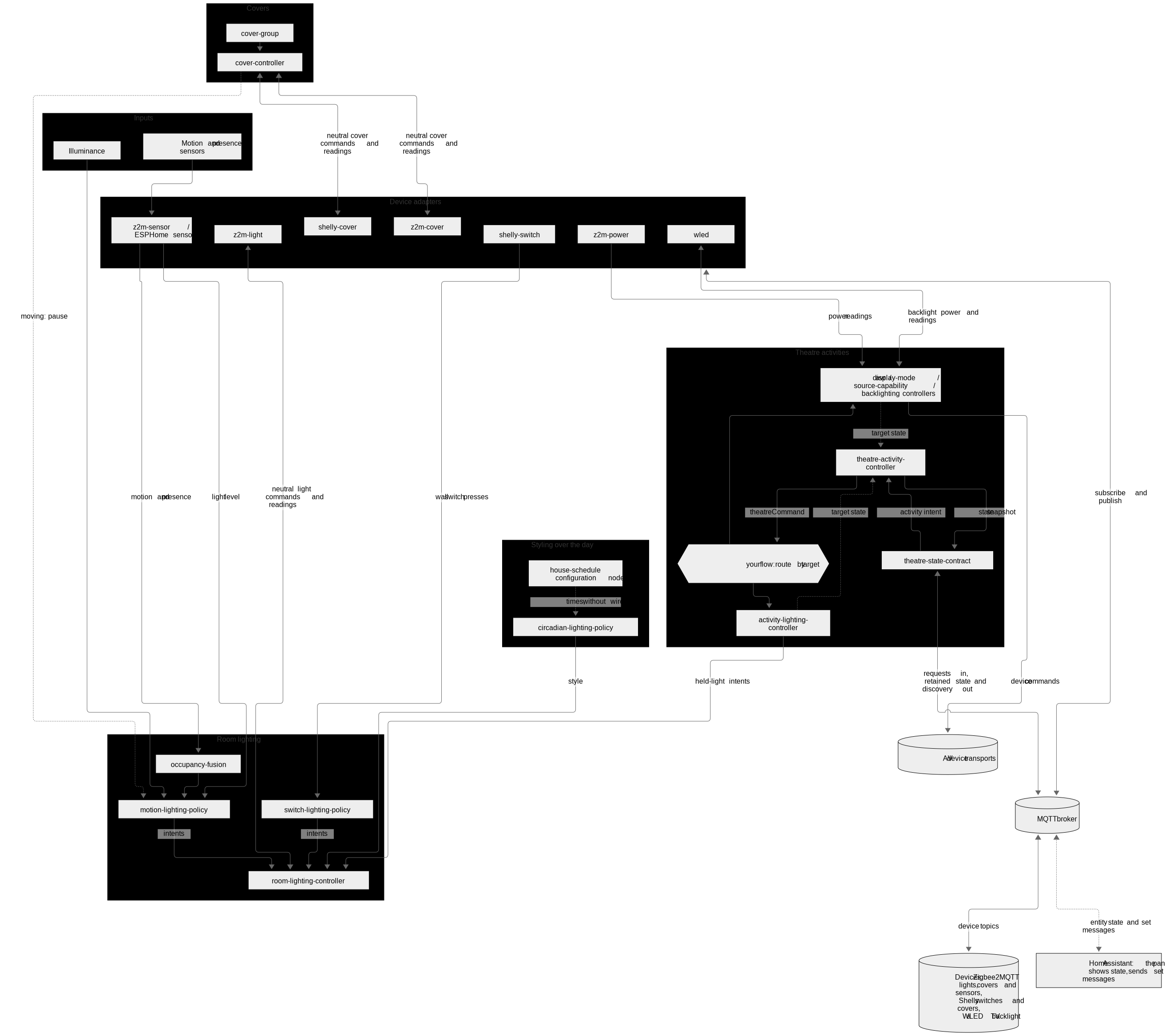
Each controller keeps the desired and the observed state, sends semantic commands, and reports done only when fresh observations confirm them.
Included nodes
In the editor's palette the nodes sit in five categories, by kind:
| Palette category | Nodes (palette label: type) |
|---|---|
| home devices | zigbee2mqtt light: home-z2m-light; zigbee2mqtt cover: home-z2m-cover; zigbee2mqtt sensor: home-z2m-sensor; zigbee2mqtt power: home-z2m-power; shelly switch: home-shelly-switch; shelly cover: home-shelly-cover; shelly power: home-shelly-power; wled: home-wled; everything presence one: home-everything-presence-one; apollo r pro-1: home-apollo-r-pro-1; sony bravia: home-sony-bravia |
| home lighting | room lighting: home-room-lighting-controller; occupancy: home-occupancy-fusion; motion policy: home-motion-lighting-policy; switch policy: home-switch-lighting-policy; circadian policy: home-circadian-lighting-policy; scene: home-scene |
| home covers | cover: home-cover-controller; cover group: home-cover-group |
| home theatre | theatre activity: home-theatre-activity-controller; theatre contract: home-theatre-state-contract; display: home-display-mode-controller; receiver: home-avr-controller; source: home-source-capability-controller; backlighting: home-backlighting-controller; activity lighting: home-activity-lighting-controller |
| home house | home-house-schedule (its configuration node); house schedule mqtt: home-house-schedule-mqtt |
Below, they come in five groups by what they do together. Each group has an importable example flow (Import → Examples in the Node-RED editor).
Room lighting
Motion, presence, illuminance and wall switches drive one room's lights, with
manual ownership, and a circadian lighting policy styles them over the day.
Wire occupancy fusion into the motion policy, wall switches into the switch
policy, and both policies and the circadian policy into the room controller. A
room without a circadian policy styles nothing: its lights just go on and off.
The room controller keeps a light a person set after the room went
vacant, so motion doesn't switch it straight off. Without a Node-RED context
store, a motion node that restarts or is redeployed doesn't know whether the
room is occupied, so it counts the room as vacant from then: someone sitting
still in a lit room has the motion-lit lights switched off after the vacancy
delay unless motion is seen. After a restart the room has also forgotten which
lights a person set, so it doesn't keep those either. Circadian
levels follow the circadian policy's wake and bed times (default 07:00 and
23:00): they rise over the hour after waking, stay bright and cool through the
day, and wind down to the sleep settings over the three hours before bed. Times
are the Node-RED host's local time. The policy sends the room a style (a
brightness and colour temperature) once the flows start, every restyle
interval and at every change; the room uses it for lights it controls, never
for one a person set or an owner such as an activity holds. One policy can
style several rooms, or each area can have its own, with its own switches in
Home Assistant. A light that only switches on and off can be marked
"onOffOnly": true in the room's targets: it is never sent brightness, colour
or a transition.
Example: Room lighting.json.
The room controller reaches each light through an adapter: a zigbee2mqtt
light node per Zigbee2MQTT light or group. Wire the room's second output into
every light's node and each node's second output back into the room, and give
each light's node a Broker (Node-RED's MQTT broker node): it subscribes to
the light's topics and publishes its commands itself, and reads the light each
time the broker connects. (Without a Broker, as before 6.2, its first output
goes to MQTT out unchanged and an MQTT in node on the light's
<base>/<friendly name>/# feeds it.) The light's node tells the room's
own commands from other people's on the light's /set topic, so a function
that rewrites them on the way makes them look like someone else's. To stop that
becoming a loop, a bare ON or OFF that arrives within 5 seconds of one of its
own commands with that power, before that command has come back on the topic,
is taken as that command, and the room restyles a light after someone else's
bare ON at most once every 5 seconds. A person's bare ON or OFF in that moment
is taken as the room's own, which changes nothing, as the light is already being
set that way; other rewrites can still be misread. The node also skips a
restyle the light already shows.
| Node | Purpose |
|---|---|
home-occupancy-fusion |
Combines PIR motion with optional presence sensing. |
home-z2m-sensor |
Connects one Zigbee2MQTT motion, presence or light sensor: its occupancy and presence to occupancy fusion, its light level to the motion policy. |
home-everything-presence-one, home-apollo-r-pro-1 |
Connect those ESPHome presence sensors the same way, one node per device, finding their entities from the device's own MQTT discovery (or the node's preset without it); while the device is online, its retained state at a restart is the room's starting point. |
home-motion-lighting-policy |
Converts occupancy and illuminance into lighting intent. A delay message (in seconds) or illuminance-cut-off message overrides its settings until they are changed and redeployed. The house-wide global-enabled is deprecated and removed in 7.0: send area-enabled to each policy instead. |
home-switch-lighting-policy |
Converts raw edges or pre-classified button actions into lighting intent while exposing input freshness and availability. |
home-circadian-lighting-policy |
Styles rooms over the day: brightness and colour temperature from wake and bed times, sleep mode, and circadian and sleep switches for Home Assistant. |
home-room-lighting-controller |
Owns the room's light commands, manual and held lights, and lighting state, and applies the style it is sent. |
home-z2m-light |
Connects one Zigbee2MQTT light or group to a room controller: the room's neutral commands become Zigbee2MQTT's /set messages, and the light's reports become readings. |
home-shelly-switch |
Connects one switch channel of a Shelly Gen2+ relay as the device is set up: a detached wall switch's presses to the switch policy, or the relay as the light; with a Target, the relay is a room light on the neutral light contract. |
A Shelly Gen2 or later relay behind a wall switch wires straight in through the
Shelly switch adapter, with no function nodes: give it a Broker and it
subscribes to the device's <prefix>/# and publishes to it itself (without
one, an MQTT in node on <prefix>/# feeds it and its first output goes to an
MQTT out node). It reads the device's own configuration for its channel (with
Shelly.GetConfig, the reply addressed under the device's prefix so its own
subscription receives it) each time the broker connects and whenever the device comes online, and shows what it found. In
detached mode, the switch's
presses go to the switch policy: a toggle switch's on/off as edges, with the
device's status as the baseline, and a push button's single, double or long
presses as actions (the switch policy acts on single and double; long is passed
on for later use). Without a Target, the relay stays on to power smart bulbs:
it is never commanded, and a relay that reports off is flagged, as the bulbs
have lost power. In any other mode the relay is the light: the node reports its
state and takes on and off. Its Mode setting overrides what was read, and
decides when the configuration can't be read.
When the relay is a room light (ordinary bulbs), give the node a Target:
the light's id in the room's Targets JSON, marked "onOffOnly": true. The node
is then that light's adapter on the neutral light contract, in detached or any
other mode: wire the room's second output into it and its third output back
into the room. The room's ON and OFF switch the relay, an observe asks for its
status, and its reports come back as readings, with a change nobody here asked
for (a person at a switch the relay follows, the Shelly app, someone else's
command on its topic) as external. Detached, the presses still go to the
switch policy. msg.switchState and msg.switchCommand work as before.
Example: Shelly switch.json.
One house schedule can set the wake and bed times for many rooms. It is a
configuration node, like an MQTT broker: choose it as a circadian lighting
policy's Schedule and the policy follows it, hearing of every change
without wires. Those policies then have no wake and bed time entities of their
own in Home Assistant. A policy that needs its own times (a child's room, say)
chooses none. Deleting the house schedule in the editor returns its policies to
their own times.
The optional house schedule MQTT node publishes the schedule's times and Home
Assistant time entities, and takes changes from them.
Example: House schedule.json.
| Node | Purpose |
|---|---|
home-house-schedule |
A configuration node: one wake and bed time for every circadian lighting policy that uses it. |
home-house-schedule-mqtt |
Publishes a house schedule for Home Assistant and changes it from Home Assistant. |
Scenes
A scene, such as "Exercise mode" or "Bath", takes some of a room's lights for a while: it holds each on or off with the values it gives them, and pauses motion lighting. It ends by request, by its safety timer (4 hours by default; 0 turns it off), when a device's power, from a power meter node on its plug, stays below its End below for a while, or when your flow sends it an end. Each room then gives its lights back what they were (see "Room light control"): a light the room was running is the room's again, on or off as it was, in the room's style as it is now; one that was off goes off; one a person had set gets their values back. A light a person changes during the scene stays theirs. Scenes stack: a newer scene holding the same light hands it back to the older one when it ends.
Wire the scene's first output to each room lighting controller whose lights it
sets, and its second to each motion lighting policy to pause. To start and
stop it from Home Assistant, give it an area, set Publish to MQTT state
and Home Assistant discovery and choose its Broker: it reads
home/<area>/scene/<name>/set from the broker itself.
Its lights are listed by their room's Area and their ids in that room's
Targets JSON; a socket is a target marked "onOffOnly": true. A room acts only
on a scene's lights for its own Area, so set the Area on each room a scene uses;
two rooms may each have a main:
[{"area": "gym", "target": "main", "state": "OFF"}, {"area": "gym", "target": "tv", "state": "ON"},
 {"area": "gym", "target": "lamp", "state": "ON", "brightnessPct": 30, "colorTempKelvin": 2700}]
Start it with msg.scene = {kind: "start"} and end it with
msg.scene = {kind: "end", by: "door opened"} (by is optional and shows
on its status). Example: Scene.json.
| Node | Purpose |
|---|---|
home-scene |
One scene: holds room lights on or off and pauses motion while on, and hands everything back when it ends; a Home Assistant switch starts and stops it. |
Home theatre equipment
Each controller owns one kind of device. It accepts a generation-scoped intent,
sends commands for your device transport on output 1, and reports target state
on output 2. Example: Home theatre equipment.json.
| Node | Purpose |
|---|---|
home-avr-controller |
Owns AVR power, zones, source selection and bounded absolute or relative volume from observed state. |
home-display-mode-controller |
Coordinates TV, projector, and screen transitions. |
home-source-capability-controller |
Gates source readiness on fresh availability, active-device, application or playback evidence. |
home-backlighting-controller |
Owns TV-backlight power with observation-gated confirmation. |
home-z2m-power |
Reads a Zigbee2MQTT plug or meter's power as msg.power: the display controller's projector power, or a scene's End below. |
home-sony-bravia |
Reads and sets a Sony Bravia TV's power over its own local REST API, for the display controller: wire the controller's third output into it and its output back. The controller's own TV host is deprecated and removed in 7.0, as is its screen host: its screen is a cover node, such as home-shelly-cover, on the same output. |
home-shelly-power |
Reads the power a Shelly Gen2+ switch channel meters (apower) as msg.power, over the device's own MQTT: the display controller's projector power, or a scene's End below. The controller's own power meter host is deprecated and removed in 7.0. |
home-wled |
Connects a WLED strip to a backlighting controller over WLED's own MQTT: on and off, read back from the brightness WLED reports. |
The display controller reads the projector's power from any meter or adapter:
send msg.display = {kind: "observed", device: "projector", power: "on"}
("on", "standby" or "transitioning"), or watts from a meter. Its
built-in Shelly meter is optional. Without one, it asks for a reading on output
3 whenever it needs one; wire that to your meter, unless the meter reports on
its own at least once per query timeout. A device that doesn't report fails
the request with reason no-reading. The node's help has the details.
For projector mode it opens the screen to its Screen viewing position, or, left empty (the default for a new node), by the screen's own open command, confirmed when the screen reports itself fully open. A node saved with a position keeps it.
Theatre activities
One request, such as "tv" or "off", drives every target. The state contract
turns MQTT requests into activity intents and publishes retained state; the
activity controller plans each target and sends msg.theatreCommand messages.
Your flow routes each command by its target (avr, display, source,
lighting, backlighting) to the matching controller's input
(msg.avr, msg.display, msg.sourceCapability, msg.activityLighting,
msg.backlighting); the example does this with one switch node and a change
node per target. Every controller reports its progress on output 2 as
msg.theatre = {kind: "target_state", target, requestId, generation, status, observedAt}, alongside its own events: wire each controller's output 2 straight
back to the activity controller. The activity controller refreshes settled
targets, and each controller answers a refresh from fresh readings. Activity
lighting feeds the room lighting controller.
Example: Home theatre activity.json.
| Node | Purpose |
|---|---|
home-theatre-state-contract |
Bridges non-retained activity requests to retained MQTT truth and, optionally, HA discovery. |
home-theatre-activity-controller |
Owns latest-request-wins activity state and aggregates target evidence. |
home-activity-lighting-controller |
Applies activity styles to room lights and holds them while the activity is active. |
Pure TypeScript policy modules live in lib/; thin Node-RED runtime and editor adapters live in nodes/.
Importable example flows for the Node-RED editor live in examples/ (Import → Examples). Executable, deployment-neutral contract examples live in contract-examples/ and exercise the same reducers as the runtime adapters.
Covers
One cover controller owns one position cover: a blind, shutter or curtain motor
that takes and reports a position from 0 (closed) to 100 (open). Send it
"open", "close", "stop", a position, or the name of a preset such as
partial. It confirms a move from what the cover reports, retries a bounded
number of times, and leaves a cover a person moved where they put it. A move is
confirmed only once the cover has stopped at the target, from a stopped
motion report or the same position for the settle time (with or without
another report), so a transport that echoes the requested position at once
doesn't end the move early. Set the settle time to at least how often the
motor reports while it travels: otherwise an echo can be confirmed before the
first travel report arrives. An
automatic target, such as a position computed from the weather, sets
msg.respectManual = true so it waits while a person's move holds; a target
the cover is already at is confirmed without a command. A button can send
msg.stopIfMoving = true with "open" or "close" to stop the cover if it is
moving and do the request otherwise. The cover's availability report
({kind: "availability", online}) keeps requests from going to an offline
device: they are answered unavailable, and the cover is read again when it is
back. A motor with no reliable position can be set to open, close and
stop only: it confirms a move from a reported end state, or from a move that
ran for its full travel time, and says when it could only judge by travel time
or could not confirm at all. Its third output says whether the cover is
moving, so other policies can react. To pause motion lighting while a blind
moves, send it to the motion policy's pause input
(msg.source = "pause", msg.payload true or false, msg.owner naming the
cover), as the example does; a pause lasts at most the motion policy's
Maximum pause unless sent again; never its enable (area-enabled), which is the
user's own switch. Device commands come out in a neutral
shape (set_position, stop or observe); the example flow wires them to and
from a Zigbee2MQTT cover through the Zigbee2MQTT cover adapter (below). Battery
and charging status are kept as reported facts and never acted on.
Switched on, a cover node publishes its state (and position) under
home/<area>/cover/<name>/, named by its Name in topics (no default: give
each cover in a room its own), and announces a Home Assistant cover entity of that name. Its open,
close and stop (and, for a position cover, set position) come back to the cover node on its own set topics
as requests like any other, carried out and confirmed as above; nothing
commands the device through Home Assistant. A cover group has no entity of its
own: Home Assistant can group the covers' entities itself.
A cover group moves several covers as one, such as the left and right of a
curtain: it sends each member the request on that member's own output, labelled
from its Members setting, and reports ready only when every member confirms,
or, if only some do, which did what.
Example: Cover pair.json.
A Shelly Gen2 or later device in cover mode wires straight to a cover
controller through the Shelly cover adapter, with no function nodes: give it a
Broker and it subscribes to the device's <prefix>/# and publishes to it
itself, and reads the cover each time the broker connects; the controller's
device commands go to it, and its second output goes back to the controller.
(Without a Broker, an MQTT in node on <prefix>/# feeds it and its first
output goes to an MQTT out node.) It speaks the device's own MQTT API, never
Home Assistant: it sends pos,<0-100>, stop, and status_update (for a fresh
reading) on <prefix>/command/cover:<id> (the device's MQTT Control, on by
default), and turns the device's status and
change notifications into position and motion readings, and its online topic
into availability. A cover that isn't calibrated, or has lost its position,
fails the command in hand with the reason rather than reporting a position.
Example: Shelly cover.json.
A Zigbee2MQTT cover wires the same way through the Zigbee2MQTT cover adapter:
set its base topic (zigbee2mqtt by default), the device's friendly name and
its Broker, and it subscribes to <base>/<friendly name> and its
/availability itself (without a Broker, MQTT in nodes on those feed it and
its first output goes to an MQTT out node). It sends
{"position": n} and {"state": "OPEN" | "CLOSE" | "STOP"} on the device's
/set, and asks for a fresh reading on its /get. Each state report becomes a
position reading, with motion from motor_state or moving where the device
reports one; a cover that reports none is confirmed by the controller's settle
time. A cover with no position (set the controller to open, close and stop
only) reports its end state once its motion says it has stopped.
Example: Cover control.json.
| Node | Purpose |
|---|---|
home-cover-controller |
Owns one cover's moves (a position cover, or open, close and stop only), confirmed from what it reports, with presets, manual ownership and a moving signal. |
home-cover-group |
Moves several covers as one, with an honest result when only some confirm. |
home-shelly-cover |
Connects a Shelly Gen2+ cover to a cover controller over the device's own MQTT API. |
home-z2m-cover |
Connects a Zigbee2MQTT cover to a cover controller over Zigbee2MQTT's MQTT messages. |
Requirements
- Node.js 22.9 or newer, as Node-RED 5 (releases 6.0.0 to 6.3.0 asked for 24)
- Node-RED 5.0.0 or newer
Install
In Node-RED, open Manage palette → Install and search for
@avantics/node-red-home-automation. Or install it from your Node-RED user
directory (usually ~/.node-red) and restart Node-RED:
npm install @avantics/node-red-home-automation
Each GitHub Release
also attaches the package tarball and its SHA-256 checksum. Download both into
one folder and check the tarball there (on macOS, shasum -a 256 -c instead):
sha256sum -c avantics-node-red-home-automation-<version>.tgz.sha256
It prints the tarball's name and OK. Checksum files from releases up to
6.1.0 name it as release/…tgz: put the tarball in a release folder beside
the checksum file to check those. Install a downloaded tarball through
Manage palette → Install → Upload module, or with:
npm install /path/to/avantics-node-red-home-automation-6.5.0.tgz
Add the installed nodes from the home automation section of the Node-RED palette, then configure the room, device hosts, MQTT topics, source mappings, and timing limits for your deployment.
Choose a Broker on each node that talks MQTT (Node-RED's own MQTT broker config node, the one MQTT in and out nodes use): the device adapters subscribe to their devices' topics and publish to them, and the publishing nodes publish their state and Home Assistant discovery and read their set topics, each by itself. No MQTT in, MQTT out or Status nodes are needed around them, and each announces itself again every time the broker connects. A node's edit dialog offers the first broker in your flows. Nodes saved before 6.2 keep working through their MQTT in and out nodes until you choose one; the example flows use one broker node, "your MQTT broker", whose host you set.
6.5.0
Nothing to migrate from 6.4.0. The display controller's own device connections move into device nodes, and three of its settings are deprecated.
Device nodes for the display. The display mode controller no longer needs to talk to its devices itself. Leave a device's host empty, wire the controller's output 3 into its device node, and that node's output back into the controller:
- sony bravia (
home-sony-bravia) reads and sets a Bravia TV's power over the TV's own local REST API, with its pre-shared key kept as a credential. - The screen goes through the cover contract: a shelly cover node (or any cover node) drives it. The shelly cover node now also acts on open and close, so an open-close cover controller drives a calibrated Shelly cover too, and a cover it knows is uncalibrated refuses them without moving.
- shelly power (
home-shelly-power) reads a Shelly switch channel's metered watts over MQTT as the projector's power, like zigbee2mqtt power.
Deprecated: the display controller's TV host, screen host and projector meter host. Each still works, but warns once per deploy and says so on its status; they're removed in 7.0, along with the TV's pre-shared key on the controller.
Also fixed:
- A display controller's request no longer fails
no-readingwhen its zigbee2mqtt power meter's draw is steady: after a read, the next report is passed on even when unchanged (#236). - Each reference page shows its node's palette category, taken from the node (#231), and an orphaned page for a node that doesn't exist is gone (#233).
6.4.0
Nothing to migrate from 6.3.0.
Node.js 22.9 or newer again. The package's minimum is back to Node-RED 5's own, 22.9; releases 6.0.0 to 6.3.0 asked for 24. Node.js 24 still works. This also clears the Flow Library scorecard's Node.js warning.
The nodes are grouped by kind. The editor's palette has five categories (home devices, home lighting, home covers, home theatre, home house) instead of one, and every node has a short palette label, such as "zigbee2mqtt light" or "receiver". Node types are unchanged, so saved flows are untouched. The README and the documentation site list the nodes the same way.
Deprecated: the house-wide motion enable. global-enabled, sent to any
motion lighting policy, still switches motion lighting for every policy, but
each policy now warns once per deploy. Send area-enabled to each motion
lighting policy instead; global-enabled is removed in 7.0.
6.3.0
Nothing to migrate from 6.2.0. New device nodes replace hand-wired MQTT in, change and function nodes for sensors, power meters and a WLED backlight, and the theatre now recovers its activity after a restart.
Sensors. Each feeds occupancy fusion (motion and presence, output 1) and the motion lighting policy (light level in lux, output 2), sends only changes, and shows offline on its status:
- zigbee2mqtt sensor (
home-z2m-sensor), one per Zigbee2MQTT motion or presence sensor, with an "Occupancy is" setting for presence-only devices. A retained occupancy is never acted on. - Everything Presence One and Apollo R PRO-1 (ESPHome), one node per
device. Each finds its sensors from the device's own MQTT discovery, so a
firmware rename can't break it, and falls back to known entity names
without it. Turn on
mqtt: discovery: truein the device's ESPHome configuration to use discovery. - Occupancy fusion takes a start-up baseline from the ESPHome nodes: a room empty at start waits out its vacancy time, and an occupied one switches nothing on.
Power. A zigbee2mqtt power node (home-z2m-power) reports a plug's
watts. The display controller takes it as the projector's power, and a scene's
new End below setting ends the scene once the device has been used and
then stays below the threshold for the set time.
WLED. A wled node (home-wled) drives a WLED strip for the
backlighting controller: on and off, and its brightness as the reading. WLED
can't be asked for its state over MQTT, so after a restart its reading comes
at its next change.
The theatre after a restart. With nothing saved, the display, receiver, source and backlighting controllers now answer the activity controller's probe with what their devices show, and the theatre adopts the one activity that matches, commanding nothing. It needs the display and receiver to have answered; a device that can't be asked, such as a WLED backlight, shows as unobserved until it reports.
Also changed:
- A theatre light that never reports ends unobserved after the
confirmation timeout, leaving the theatre ready but degraded instead of
confirming forever, and a Zigbee2MQTT group with no state says to set
retain: truefor it (#186). - Each device node's reference links to its maker's or project's documentation.
6.2.0
Nothing to migrate from 6.1.0: flows wired the 6.1.0 way keep working. Two things are worth doing when you're ready.
Choose a Broker, and delete the MQTT plumbing around your nodes. Every node that publishes, and every device adapter, has a new Broker setting: Node-RED's own MQTT broker node. With one, the node talks MQTT itself:
- publishing nodes publish their state and Home Assistant discovery, and read their set topics, themselves;
- device adapters (zigbee2mqtt light and cover, Shelly cover and switch) subscribe to their device's topics and send its commands themselves, and read the device each time the broker connects;
- each time the broker connects, and each time Home Assistant restarts, a node runs its startup and announces everything again, so entities come back by themselves.
The MQTT out, the MQTT in for set or device topics, and the Status node around that node can then be deleted. A node keeps working through its old wiring until you choose a broker: an output it no longer needs goes quiet, and a message it now gets from the broker itself is ignored, with a trace. Opening and saving a node offers the first broker in your flows. The examples show the new wiring.
One Publish setting. "Publish state over MQTT" and "Home Assistant discovery" become one choice, Publish: Don't publish, MQTT state, or MQTT state and Home Assistant discovery. Saved nodes read their old settings exactly as before.
Also new in 6.2.0:
- A scene node (
home-scene): one per scene, such as Bath or Exercise mode. While on, it holds some rooms' lights on or off and pauses motion lighting. When it ends, by request, by its safety timer (4 hours by default) or by a message your flow sends, each room gives its lights back what they were. Scenes stack, a person's change during a scene stands, and Home Assistant gets a switch for each. Lights are named by their room's Area and id. - A Shelly relay as a room light. Give a Shelly switch node a Target and it becomes that light's adapter, in detached or relay mode.
Fixed:
- Motion lighting acts on a vacancy that came while it was paused or switched off, so lights in an empty room go off when a scene or activity ends (#193).
- A cover acts only on its own set topics; wired to a wildcard, its own or another cover's published state no longer moves it (#198).
- The theatre state contract publishes a retained topic only when it changes, instead of every topic on each target refresh (#206).
- A theatre target's confirmation time is measured once per transition (#208), and an untimed transition no longer counts as 0 ms in the latency objective (#210).
- The release checksum file names the tarball alone, so
sha256sum -cworks next to a download (#178).
6.1.0
Nothing to migrate from 6.0.0, but check one wiring change: publishing nodes now announce themselves when MQTT out connects.
Wire a Status node watching MQTT out into each publishing node. Node-RED's MQTT broker node connects after the flows start and drops anything sent before then, so in 6.0.0 the Home Assistant discovery and availability a node announced as the flows started could be lost after a restart or a full deploy (#185). A message from a Status node whose scope is your MQTT out node now counts as the node's startup message when it reports "connected", including after every reconnect. An existing startup inject keeps working. From 6.2, choose a Broker on the node instead: it announces itself on every connect, and the Status node is no longer needed.
Room owners hold lights on or off, stack, and give lights back. An owner, such as an activity or the coming scene node, now keeps a light it switches off held off, so motion leaves it alone. Owners stack per light: the newest holds a shared light and hands it to the one beneath when it releases. When the last owner lets go, a light the room was running is the room's again, a light that was off goes off, and a light a person set gets its values back and stays manual. In a home theatre, a light a person changed during an activity and a later request took back now gets the person's values back when the activity ends.
Also fixed:
- Zigbee2MQTT light nodes no longer log an error for every command meant for another light in the same room (#184).
- Zigbee2MQTT groups: the docs recommend
retain: trueunder the group in Zigbee2MQTT'sconfiguration.yaml, so the room has a group's state after a restart (#186).
6.0.0
Circadian lighting becomes its own node, the room controller reaches its lights through light adapters, 6.0 requires Node.js 24, and it removes what 5.0 kept working for a release. Check these after upgrading from 5.x; each shows itself rather than failing silently.
Every room lighting controller needs migrating. Two things moved out of the room controller: circadian lighting, sleep, the wake and bed times and the house schedule, to a new circadian lighting policy; and each light's Zigbee2MQTT topics, to a zigbee2mqtt light node per light, which now speaks to the light. A room saved before 6.0 is an invalid configuration until you migrate it, and its lights don't respond to anything until then. Every room saved by 5.x has both, so migrate each one; its edit dialog lists everything below. One edit covers both moves:
- Its lights. In the room's dialog, click Create Zigbee2MQTT light
nodes: it adds a zigbee2mqtt light per light, with the base topic and
friendly name read from the light's old topics, wired from the room's light
commands (its new second output) and back into the room, its MQTT messages to
the MQTT out the room publishes through, and an MQTT in node on the light's
topics when that MQTT out shows the broker. Or add them yourself: Target is
the light's id, and an MQTT in node on
<base>/<friendly name>/#feeds each. Delete the old MQTT in nodes on the lights' state and command topics. A light whose topics weren't Zigbee2MQTT's (<base>/<name>and<base>/<name>/set) is flagged: set it up by hand on the neutral light contract. A Zigbee2MQTT group works the same way: tick Zigbee2MQTT group on its node, and setretain: trueunder the group in Zigbee2MQTT'sconfiguration.yaml, so the room has its state after a restart (a group can't be asked for it). - Add a circadian lighting policy from the palette and wire its first
output into the room controller. One policy can feed several rooms that
share its settings, but its Home Assistant switches and set topics are named
after its own area only: rooms in other areas lose their
home/<area>/circadian/settopics and switches, so give each area that needs its own switches its own policy. - Copy the room's old settings into it: wake and bed times (or its house schedule), the daytime and sleep brightness and kelvin, the refresh transition and interval (now Restyle transition and Restyle interval), and initial sleep. The room's edit dialog lists its old values.
- To keep the Home Assistant switches, give the policy the room's area, set
Publish to MQTT state and Home Assistant discovery (before 6.2: switch
on Publish state and Home Assistant discovery), and choose its
Broker, or wire its second output to MQTT out. Move any MQTT in node on
home/<area>/circadian/set,…/sleep/set,…/wake-time/setor…/bed-time/setfrom the room to the policy, and any flow sending{kind: "circadian" | "sleep" | "schedule"}. - Click Done: saving keeps only each light's id in Targets JSON and clears the old circadian settings, and the room runs again. Deploy it with its policy and light nodes. A room that should stay unstyled skips steps 2 to 4.
The room's own output is now three: 1, its MQTT publications (control states,
availability, discovery), still wired to MQTT out; 2, light commands
(msg.light) for its lights' nodes; 3, each light's reading, for activity
lighting, which now confirms its lights from them. A flow that filtered the
room's output by the old command topics must now take the zigbee2mqtt light
nodes' output instead. The /set messages are byte for byte what the room sent
before, proven by a regression test over 400 generated histories.
As it starts, the policy clears the circadian, sleep, wake and bed entities that rooms in its area published before 6.0, migrated or not, then announces its own in the same batch, so Home Assistant can give them the old entity IDs. The room clears its own as it starts too. A 5.x room deleted rather than migrated is invalid, so it clears nothing: remove its retained topics and entities yourself. A room inside a subflow isn't found this way yet (#171): migrate it and send it a startup message before you add its policy, so it clears its own old entities first. A room without a circadian policy just switches its lights on and off. Two further room changes come with it:
-
A light's availability from its node (Zigbee2MQTT's availability) is shown on its control state (
available) and in the room's status, and changes nothing. -
A light can be marked on/off only with
"onOffOnly": truein the room's targets: it is never sent brightness, colour or a transition, and values for it are left out with a warning. Activity lighting judges each light by what it reports: one that has never reported brightness or colour temperature since start is confirmed by being on, with a warning once per deploy if a profile gives it values. -
An intent's values alone no longer make a light manual: only
manual: truedoes (a wall switch's double press sends it). Before 6.0, an owner-less intent with values made the light manual, so circadian lighting left it alone; now the next style restyles it. -
A person changing a light an activity holds is a manual override. Before 6.0, activity lighting counted such a light as preserved and stayed ready. Now it reports
manual_overridefor it, as the display, receiver and backlight do; lighting is optional, so the theatre is degraded, not failed, and the next activity request takes the light back. A light that was a person's before the activity is still left alone, as before. -
An intent's
refresh: trueno longer changes its transition. Before 6.0 it styled the light over the refresh transition instead of the turn-on one; the circadian policy now sends a new style whenever anything changes.
The other changes:
- Node.js 24 or newer is required. Node.js 22 is no longer supported.
- Enable inputs take only
trueorfalse. The motion policy'sarea-enabled,global-enabledandpause, and the circadian lighting policy's{kind: "circadian" | "sleep", enabled}, no longer read strings such as"ON"or"on". Any other value is refused: nothing changes, the node logs a warning once per input per deploy, and its status says what was refused. Before 6.0 the motion policy read "on" in any case as on and anything else as off, and the room controller read anything buttrueas off. Home Assistant's ownONandOFFon the…/settopics are unchanged: the nodes translate them. - Lighting values in Zigbee2MQTT's units are gone. Intents take only
brightnessPct(0-100) andcolorTempKelvin: abrightnessorcolor_tempin an intent is left out, never sent to the light, and the room controller logs a warning once per deploy. An activity lighting profile using them is an invalid configuration, shown on the node. For example, brightness 64 becomes brightnessPct 25, and color_temp 400 becomes colorTempKelvin 2500. - Receiver volume is only in dB. A volume request with
value(the receiver's 0-98) and novalueDbis answeredvolume_rejectedwith reasonremoved-volume-value, and the node logs a warning once per deploy. A node saved before 5.0 and never re-saved, with only its 0-98 minVolume and maxVolume, is an invalid configuration naming the dB setting to set, rather than getting the default bounds, which could be louder than its old cap. In the editor such a node shows as invalid until its dB bounds are set, and deploying it from the editor keeps it invalid rather than dropping the old bounds. projectorMeterHostis no longer read. Set Projector power meter host (projectorPowerMeterHost). A node that still names only the old key is an invalid configuration saying so, in the editor and when deployed, until the new host is set.- The package's files can no longer be imported directly. Its exports map
exposes only
package.json, sorequireorimportof@avantics/node-red-home-automation/dist/…fails withERR_PACKAGE_PATH_NOT_EXPORTED. Only the nodes are a public interface, as 5.0.0 said. Node-RED loads them by file path, so installing and using the nodes is unchanged.
Also new in 6.0.0, with nothing to change:
- Zigbee2MQTT cover and Shelly switch nodes. The Zigbee2MQTT cover adapter replaces the hand-written function nodes in the Cover control example. The Shelly switch node follows the relay's own mode: a detached wall switch's presses go to the switch policy, and the relay is never switched.
- A Shelly script (
shelly/wall-switch-fallback.js) that keeps a detached wall switch working as an ordinary switch while MQTT or Node-RED is down (see the wall switches guide). - Discovery as the flows start. Every publishing node, now including the room controller and the theatre state contract, announces its Home Assistant entities once the flows start, as well as at its startup message. On a first start, a full deploy or a restart that announcement is lost, as Node-RED's MQTT broker node connects only afterwards, so from 6.0.1 wire a Status node watching your MQTT out node into each publishing node: it announces again each time MQTT out connects (see "Send each publishing node its startup message" below).
- A documentation site with a guide for each area, a reference page for every node and a releases page: avantics-hq.github.io/node-red-home-automation.
5.0.0
Separates the decision logic from the devices it drives, adds a Shelly cover adapter, and fixes theatre recovery and screen handling. Check these after upgrading from 4.0:
- Lighting values are in percent and kelvin. Intents and activity lighting
profiles take
brightnessPct(0-100) andcolorTempKelvininstead of Zigbee2MQTT'sbrightness(1-254) andcolor_temp(mireds), and the switch policy's double press now sends{brightnessPct: 100}. Your lights get the same commands. The old values still work in 5.x, with a warning in the log; change them before 6.0. For example, brightness 64 becomes brightnessPct 25, and color_temp 400 becomes colorTempKelvin 2500 (1,000,000 ÷ mireds). 0% is the dimmest level, not off: send state OFF to switch a light off. - Receiver volume is in dB (a Denon's 80 is 0 dB). Send
valueDbin volume requests.valueon the receiver's 0-98 scale still works in 5.x, with a warning, and stops in 6.0. Saved volume bounds are converted when read; open and save the node to store them in dB. The published volume state and the Home Assistant volume number now show dB, as do the node's volume results and state messages, so update any automation or flow that sets or reads them with 0-98 values. Without a context store, the old retained volume can sit outside Home Assistant's new dB range until the receiver first reports after a restart. - The display controller's settings are named by role: TV host, TV
pre-shared key, Screen controller host and Projector power meter host (saved
as
projectorPowerMeterHost). A flow saved before 5.0 keeps working; open and save the node to store the new name before 6.0, whenprojectorMeterHoststops being read. No warning is logged for this one. - The projector's power can come from any meter or adapter: send
msg.display = {kind: "observed", device: "projector", power: "on" | "standby" | "transitioning"}, orwatts. The built-in power meter host is now optional. Without it, wire the new third output (projector power queries) to ask your meter for a reading. Leave output 3 unwired only if your meter reports on its own at least once every Query timeout, even when the power doesn't change: a meter that reports only on a change says nothing while the projector sits steady. Saved wiring on outputs 1 and 2 is kept. Power values are lower case only (on,standby,transitioning); a smart plug's ownONorOFFis rejected, so send its watts. - A display request fails rather than waiting when a device hasn't reported
within Query timeout × Maximum attempts (it's asked again once): the reason is
no-reading, naming the device. Before, it waited in discovering. This applies with the built-in hosts too. - The screen opens by its own command when no viewing position is set. A
display node with no Screen viewing position (new nodes, and flows written
without the key) opens the screen with the screen's own open command and
confirms it fully open, rather than going to 82%. Nodes saved with a position
keep it; a saved position must now be above 0 and at most 100, or empty, or
the node won't deploy. Closing always uses the screen's own close command and runs to the
end, which also restores a position the screen has lost. A screen with a
viewing position but no known position is closed first, then sent to the
position; one that has never been calibrated fails with
screen-not-calibrated. The display's state events may report the screen's position as null when it reports only open or closed. - Theatre recovery now reaches the devices. After the theatre recovers an activity, each device takes on the new request by reading itself, never by commanding: one that matches is ready, and its old manual override clears; one that doesn't reports a manual override once. Before, devices kept the old request, and a flow that recovered on every manual override could loop.
- Backlighting's ready carries the time of its reading, so a repeated request no longer counts as a fresh reading, and a silent device is reported stale and then not responding.
- New node: Shelly cover, which connects a Shelly Gen2+ cover to a cover controller over the device's own MQTT API (see "Covers").
- For code that imports the package's files directly: the display's device
transport moved from
dist/lib/display-transporttodist/lib/transports/display-transport. Only the nodes are a public interface.
4.0.3
Fixes the theatre state flapping on every scheduled refresh: with an activity
settled and ready, backlighting and room lighting reported themselves as
confirming while they re-read their devices, so the theatre published
unknown and back, and counted drift each time. A refresh of a ready target
now re-reads it without leaving ready, as the display, receiver and source
already did. A target that really changes on its own still counts as drift.
4.0.2
Fixes the display controller switching the TV off before the projector was ready: with a source playing, there was sound but no picture while the screen opened and the projector warmed up. Projector mode now starts the projector and waits for its warm-up, opens the screen, then puts the TV in standby, so the picture stays up and the TV stays on if the projector fails to start. A request made while the projector is warming up or cooling down now waits for that to finish, so the lamp is no longer left on or toggled mid-warm-up.
4.0.1
Fixes the cover controller ending a move too early when a transport echoes the
requested position as soon as the command is sent, before the motor moves: the
cover showed as stopped while it was still travelling, and the travel after it
was taken for a person's move. A move now confirms only once the cover has
stopped at the target, from a stopped motion report or the same position for
the settle time. Set the settle time to at least how often the motor reports
while it travels (see Covers).
4.0.0
Adds cover control, a house schedule, and Home Assistant entities for every publishing node. Check these after upgrading from 3.0:
- Breaking: theatre recovery never switches a running activity off. After a
restart or redeploy with unclear evidence, the activity is reported as unknown
and the devices are left alone until the next request. The "Recovery Off
activity" setting is gone, and a saved value is ignored. The metric
recoveriesSafeOffis nowrecoveriesUnknown(in<base>/metrics, shown as attributes of the "Transition latency" sensor), and the eventrecovery_safe_offis nowrecovery_unknown. Update any dashboard, template or flow that uses the old names. - Breaking: the theatre's readiness moved topics. It is now on
<base>/readiness, and its Home Assistant sensor is "Readiness".<base>/availabilitynow carriesonlineoroffline(see "Availability" below). - Breaking for areas that aren't identifiers: a room or theatre contract whose
area has spaces or other characters now publishes under the lowercase form,
for example
home/living_room/…instead ofhome/Living Room/…(see "Discovery" below). - Without a context store, a restart or redeploy is gentler: a room leaves its lights alone until something names them, motion lighting starts its vacancy countdown, and a theatre device re-learns its activity from the theatre instead of being marked unresponsive. A file context store keeps state across restarts instead.
- A Catch node fires once per input error, not twice.
- New nodes: a cover controller for blinds, shutters and curtains, a cover group, a house schedule that sets many rooms' wake and bed times, and a house schedule MQTT node for Home Assistant (see "Covers" and "Room lighting").
- New outputs, off until you switch publishing on: occupancy fusion and the motion policy gain a second output, and the AVR controller a third, for their MQTT state and Home Assistant entities. Saved nodes are unchanged.
- Home Assistant: availability, entity names that survive area renames, the room's sleep switch and wake and bed times, receiver volume, and cleanup of a deleted node's entities, described under "Upgrading from 2.x" below.
- Other flows can pause motion lighting without changing the user's enable.
3.0.1
Fixes the room lighting controller looping on its own commands when something
between it and MQTT out rewrites them, for example a function that cuts a styled
ON down to {"state":"ON"}: it took each rewritten command for someone else's
and answered with another, without end. It now takes a bare ON or OFF that
arrives within 5 seconds of one of its own commands with that power, before that
command has come back on the topic, as that command, and restyles a light after
someone else's bare ON at most once every 5 seconds.
It also no longer marks a light manual when its own command is seen twice. Wire
its commands to MQTT out unchanged (see Room lighting).
Upgrading from 2.x
Version 3.0 changed some behaviour, and later versions added to it. Check these after upgrading from 2.x, along with the notes above:
- Wall switches go through the switch lighting policy node. The motion lighting policy no longer handles them, and ignores switch messages, so rewire any wall switch that feeds a motion node. The room lighting controller now keeps a light that a person set after the room went vacant, instead of the motion node.
- The motion node's
delaymessage takes seconds, the same unit as its "Vacancy seconds" setting; it took minutes before. A redeploy with a changed vacancy delay or lux cutoff now takes effect. - Settings are checked when you deploy. An emptied or unusable setting shows "invalid configuration", and the node's log says which setting is wrong. A setting your flow saved before it existed still takes its default.
- No node assumes a room. An empty area is allowed. A node that publishes needs one where it names something:
the theatre state contract for its default base topic (
home/<area>/theatre), and a room lighting controller for the topics it publishes. A theatre state contract added from now on doesn't need one for Home Assistant discovery: its entity IDs then come from its display name. With an area, it suggests that area to Home Assistant, which creates it if no area of that name exists. One saved before needs an area for discovery, as before. A room lighting controller with no area still controls its lights only with state publishing and discovery both off; with either on (or unset, as on a room saved before 3.0), it reports an invalid configuration. - MQTT state publishing and Home Assistant discovery are opt-in on the room lighting controller and the theatre state contract. New nodes start with them off. Nodes in a flow saved before 3.0 keep publishing until you untick the setting. Switching discovery off removes the entities from Home Assistant.
- Discovery goes under the Discovery prefix setting (
homeassistantby default, as in Home Assistant) on both nodes, and every entry names this package and its version as its origin. Topics and IDs use the area in lowercase, with each run of spaces or other characters (anything but letters, digits,_and-) as_: "Living Room" publishes underhome/living_room/…, and "living-room" is unchanged. Names shown in Home Assistant keep the area as you typed it. - Entity names. A room lighting controller or theatre state contract you add from now on names its Home
Assistant device, unique IDs and discovery topics after its Node-RED node ID (
nrha_<node id>…), so renaming its area or display name updates the same entities. Nodes in flows saved before this keep naming them after the area, exactly as before, so nothing changes for them in Home Assistant. Either way, the entity ID Home Assistant first gives an entity comes from the area, with-as_. Importing or pasting a node in the editor keeps its saved settings, including its ID scheme and publishing, so an older node restored from a backup keeps its area-named entities. Only a node added from the palette starts as new. - Occupancy fusion can publish too, off unless you switch it on: its occupancy as retained
ON/OFFonhome/<area>/occupancy/state, with availability, and an occupancy binary sensor in Home Assistant. These go on its new second output, so wire that to an MQTT out node; the first output still feeds the motion policy. - The motion lighting policy can publish too, off unless you switch it on: whether this node's motion lighting
is enabled and its vacancy delay in seconds (
home/<area>/motion/enabled/stateand…/delay/state), which it also takes from their/settopics, and a switch and a vacancy delay number in Home Assistant. These go on its new second output; the shared global enable is not published. - The AVR controller can publish what the receiver reports, off unless you switch it on: power, source and
volume, retained under
home/<area>/receiver/, with availability, and Home Assistant power and source sensors and a volume number (see "Receiver volume ownership"). These go on its new third output, apart from the receiver commands and the theatre's state. - Topics no longer published are cleared. Once the flows have started, and again at its startup message, a node clears any retained topic it published before and no longer does, for example after an area, base topic, discovery prefix or target change. It remembers what it published in its node context, which lasts across deploys and restarts only with a context store configured (see "Recommended setup"). Without that record, an occupancy, motion, receiver or house schedule MQTT node named after itself (node-based IDs) that publishes state still clears its own Home Assistant entities it no longer publishes, such as after you switch discovery off; it never clears topics another node could publish. Other old topics, after an area, base topic, discovery prefix or target change, or after you switch publishing off entirely, are cleared only from the record. A node that never gets a startup message keeps clearing its old topics at every start, so to move an area from one older room node to another, send the old node a startup message, or delete it.
- Send each publishing node its startup message once MQTT out has connected: wire in a Status node. Node-RED's MQTT broker node connects after the flows have started and drops anything it is given before then, without a warning, so what a node announces as the flows start (its availability, discovery and state) is lost on a first start, a full deploy or a restart. Add a Status node whose scope is your MQTT out node and wire it into each publishing node (room, circadian policy, house schedule MQTT, motion, occupancy, cover controller, AVR controller, theatre state contract, Shelly switch, scene). Each time MQTT out shows "connected", including after the broker reconnects, the Status node passes it on, and the node takes it as its startup message. Other status messages are ignored, so a Status node watching every node on the flow works too. Since 6.0.1; before that, the examples sent the startup message from an inject node 3 seconds after a deploy, which is lost if the broker takes longer. A node still takes its own startup message (each node's section gives it). From 6.2, choose a Broker on the node instead: it runs its startup on every connect itself, with no Status node.
- Removing entities: deleting a node clears its Home Assistant entities and retained state, but only when you deploy with "Modified nodes" or "Modified flows". On a full deploy (the deploy button's default), Node-RED stops the MQTT out node at the same moment, so the clearing never reaches the broker. Disabling a node or its flow keeps its entities, so they come back unchanged when you enable it again. To remove a node's entities after a full deploy, or to remove the entities of a flow you copied to another Node-RED (the copy's nodes have new IDs, so new entities), delete the device in Home Assistant: Settings → Devices & services → Devices, open the device, then Delete. Home Assistant then clears its retained discovery entry itself.
- Availability: each publishing node sends a retained
onlineonce the flows have started (and again at its startup message) andofflinewhen it stops, onhome/<area>/lighting/availability(room) or<base>/availability(theatre), and its Home Assistant entities follow it. These get through when the node is deployed on its own ("Modified nodes" or "Modified flows"), while the MQTT connection stays up. On a full deploy, a restart or a shutdown, Node-RED stops the MQTT out node at the same moment and reconnects to the broker afterwards, so set the MQTT broker node's Birth message toonline, and its Close message and Will message (which covers crashes) tooffline, all retained, on the same topic; with several publishing nodes, the broker can cover one of them. With discovery on, each publishing node also announces its Home Assistant entries once the flows have started, just before itsonline, and again at its startup message. The theatre's readiness (unknown,available,degradedorunavailable), which used<base>/availabilitybefore, is now on<base>/readiness.
Theatre MQTT contract
The whole-theatre MQTT contract uses non-retained requests at
home/<area>/theatre/request; every request supplies a unique requestId and an
explicit configured activity. Controller output is retained under desired,
current, phase, transition (when the latest transition started and finished, and which
targets it left degraded), failure, readiness, metrics, slo, and health/<target>,
each only when it changes beyond its times (observedAt,