FlowFuse Expert: MCP-Powered Insights with RBACs
Following on the the introduction of FlowFuse Expert MCP-Powered Insights we have added annotations to the FlowFuse MCP nodes and linked them up with the FlowFuse roles. This permits a level of control over who can access what. This is just a first step, we will be working in the area over the next few iterations.
MCP Tools Node
To facilitate a level of role based access control in the Expert, we have leveraged the new Granular RBACs and MCP annotations to introduce 2 means of filtering and control:
- By application - as introduced in FlowFuse 1.5
- By pre-defined role level mapping to the annotation hints. For instance, users with a 'Viewer' role will only be exposed to tools marked with the Read Only hint, while Destructive tools are reserved for 'Owners'. The screenshot below indicates more clearly what this mapping is.
To facilitate this, we have the next version of our MCP Server Nodes will introduce the 4 MCP standard annotations:
- Read Only Hint: Lets the MCP Client know that the tool is read-only and does not modify any data or state. This hint can be used by LLMs to understand that invoking this tool will not have side effects, making it safe for exploratory queries or information retrieval.
- Destructive Hint: Lets the MCP Client know that the tool performs destructive actions that may modify or delete data. This hint can be used by LLMs to exercise caution when invoking this tool, as it may have irreversible effects.
- Idempotent Hint: Lets the MCP Client know that the tool is idempotent, meaning that multiple invocations with the same parameters will have the same effect as a single invocation. This hint can be used by LLMs to understand that it is safe to retry or repeat calls to this tool without causing unintended side effects.
- Open World Hint: Lets the MCP Client know that the tool operates in an open-world context, meaning it may interact with external systems or data sources beyond the immediate environment. This hint can be used by LLMs to understand that invoking this tool may involve uncertainties or dependencies on external factors.
These annotations are not exclusive to FlowFuse or FlowFuse Roles, they also are useful for your own Agents and LLMs.
Note: Hints do not enforce behavior. The actual behavior of the tool depends on how it is used in your flows
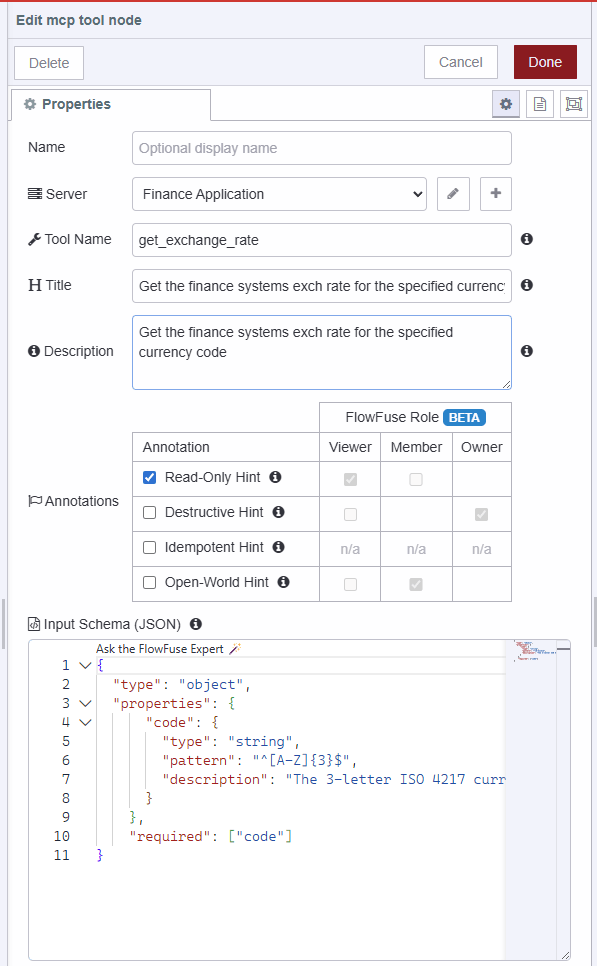 MCP Server Tool Node with new annotations
Note: This feature is currently in Beta. We are actively expanding these capabilities and would love to hear how you are using MCP to extend your systems.
Written By:
Published on:
Recent Updates:
- Getting started with FlowFuse straight from the terminal
- FlowFuse Expert Can Now Work With Your Tables
- A Dedicated Home for Your Dashboards
- Application Roles from SSO Groups
- FlowFuse Expert Enhancements