node-red-contrib-dashboard-average-bars
Calculate and display the average values of msg.payload in a bar chart.
Version: 0.0.6Weekly Downloads: 7,805Author:Fred HuardUpdated: May 11, 2022
node-red-contrib-dashboard-average-bars
Calculate and display the average values of msg.payload in a bar chart.
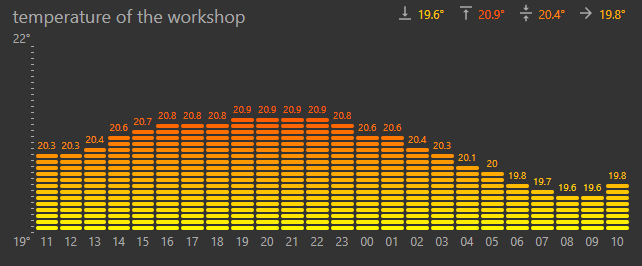

Pre-requisites :
node-red-contrib-dashboard-average-bars requires node-red-dashboard. The average-bars node is necessarily linked to the node-red dashboard template node. The average-bars node create the input msg of the template node and the template node display the chart.

Releases :
Version 0.0.6 :
- Fixed bug : wrong bar height when dashboard automatically refresh
Version 0.0.5 :
- The top and the bottom values of the Y-axis can be forced.
Version 0.0.2 :
- First published version
Node properties :
X-axis :
- last hour : 1 bar per minute
- last day : 1 bar per hour
- last week : 1 bar per day
- last month : 1 bar per day
- last year : 1 bar per month
- msg.topic : 1 bar for each msg.topic
Y-axis :
- "auto" : y-axis is calculated according to the msg.payload received.
Bar style :
- rectangle : classical bar
- equalizer : equalizer bar style
Bar colors : choice the color gradient of the bars
Display values : check boxes to display or hide values :
- bar values : value above the bar
- x-axis values : period values (or msg.topic if x-axis = msg.topic )
- last value : the last msg.payload received
- chart average : the average of all values received
- chart minimum : the minimum of all values received
- chart maximum : the maximum of all values received
Unit : unit to display behind values
Decimals : number of decimals to display
Font color : color of the scale and the values
Note :
- Average-bars node values can be cleared by sending the string "clear" in the msg.payload.
- Node-red reboot : keep the node values by storing the context values ( see contextStorage attribute in settings.js )
Quick Stats
Current Version0.0.6
Weekly Downloads7,805
First PublishedSep 8, 2018
Last UpdatedMay 11, 2022


