How to Stop Noisy Sensor Data from Flooding Your Industrial System
A practical guide to suppressing sensor noise in industrial systems using FlowFuse

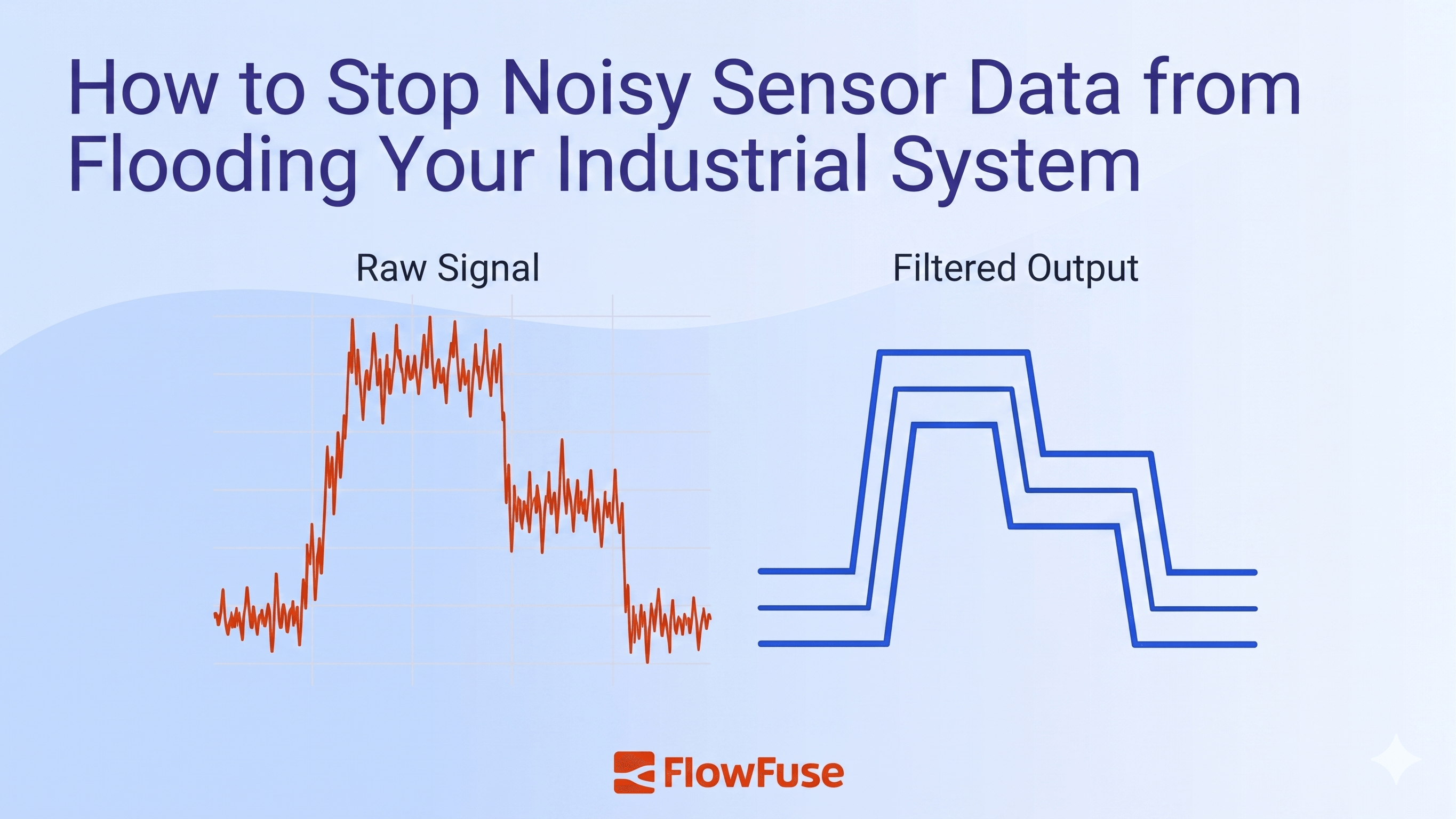
Industrial sensors constantly fluctuate due to electrical noise, vibration, and ADC artifacts a deadband filter suppresses this by only forwarding a new value when it has moved beyond a defined threshold from the last accepted reading. FlowFuse has a built-in filter node that implements this in no-code configuration, and this guide walks through setting it up to handle single or multiple sensors independently, with practical advice on choosing the right threshold.
In industrial systems, sensors rarely sit perfectly still. A temperature probe, pressure transducer, or flow meter will constantly fluctuate. Not because the process is changing, but because of electrical noise, vibration, or quantization artifacts in the ADC. If your control system reacts to every tiny wiggle, it triggers unnecessary alarms, wears out actuators, and buries real events in a fog of jitter.
A deadband filter fixes this with a single rule: only report a new value if it has moved beyond a defined threshold from the last accepted reading. Computationally trivial and tunable with one parameter, it is the simplest first line of defense for any industrial sensor pipeline. In this post, we will break down how it works, when to use it, and how to implement one in FlowFuse.
What is a deadband filter?
A deadband filter is a signal processing technique that suppresses small, insignificant changes in sensor readings. Instead of reporting every value the sensor produces, it only forwards a new reading when the value has changed by more than a defined threshold from the last accepted value. Anything that falls within that band is considered noise and silently discarded.
Think of it like a thermostat. Your home heating does not kick in every time the temperature shifts by 0.1°C. It waits until the temperature drops past a meaningful threshold before reacting. A deadband filter applies the same logic to any continuous sensor signal.
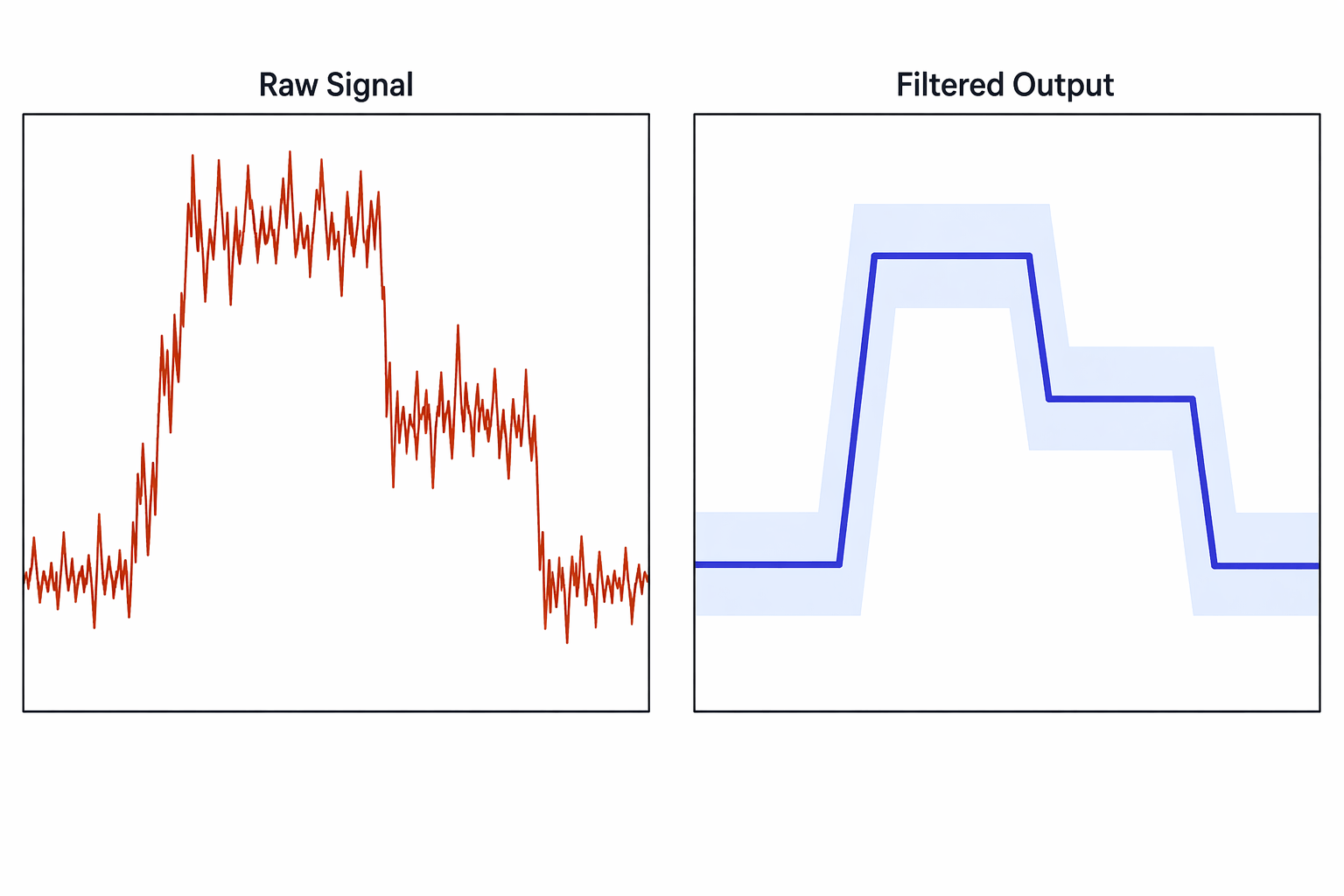 Raw sensor data (left) vs. deadband-filtered output (right). The shaded band shows the deadband zone. The filter only updates when the signal crosses its boundary.
As shown above, the raw signal on the left is erratic and full of jitter. The filtered output on the right steps cleanly. It only moves when the signal genuinely crosses the deadband boundary, ignoring everything in between.
How does a deadband filter work?
The logic is straightforward. The filter keeps track of the last value it accepted and compares every new incoming reading against it. If the difference is greater than the deadband threshold, the new value is accepted and passed downstream. If not, it is ignored and the last accepted value is held in place.
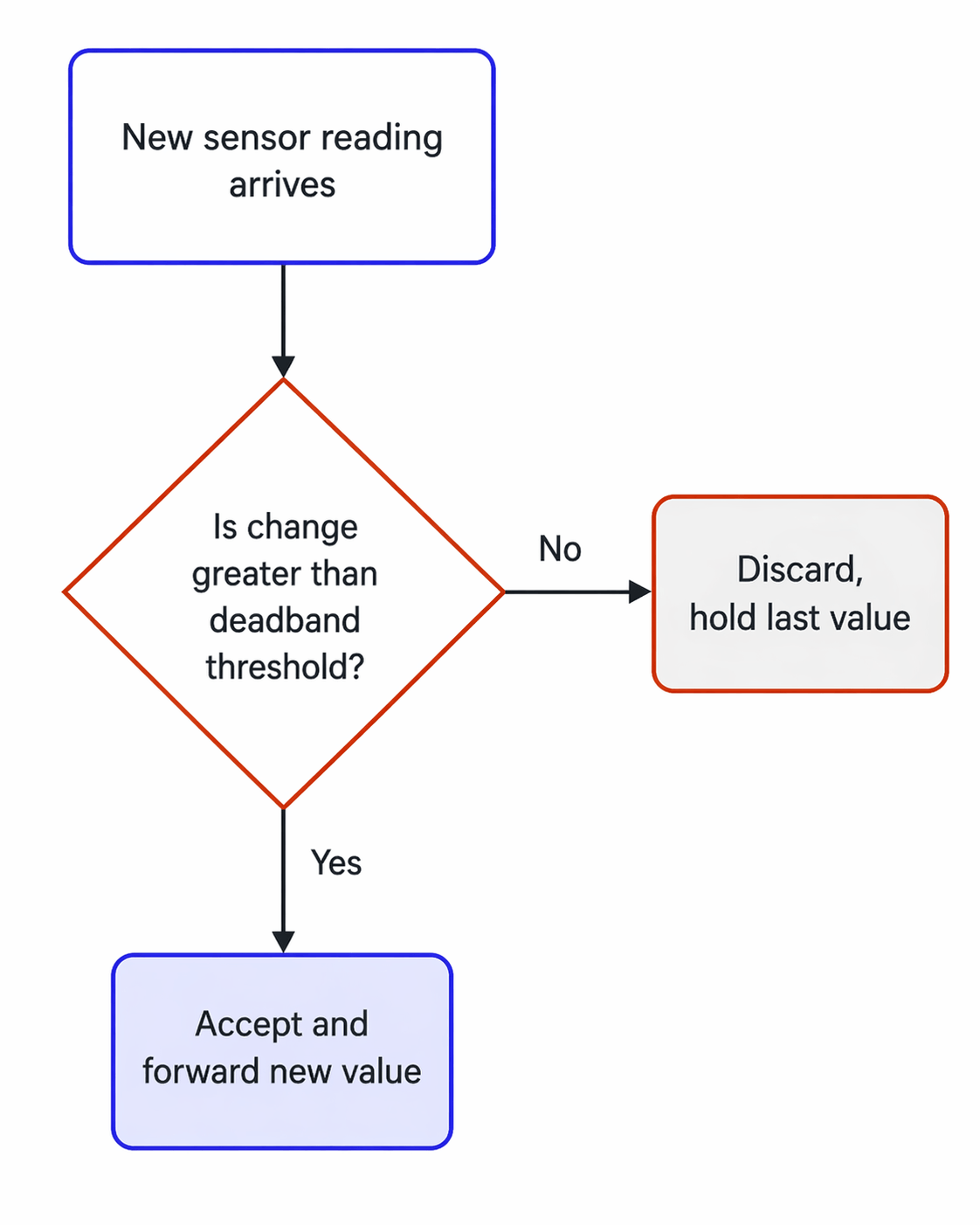 Each incoming sensor reading is compared against the last accepted value. Only readings that exceed the deadband threshold are forwarded. Everything else is silently discarded.
That single comparison is the entire filter. No buffers, no history, no moving averages. Just one stored value and one threshold check per incoming sample.
Choosing the right threshold
Setting the deadband too narrow lets noise through and defeats the purpose. Setting it too wide causes the filter to miss real process changes or report them too late. The right value sits just above your sensor noise floor.
A practical starting point is to measure your sensor output when the process is known to be stable, observe the peak-to-peak fluctuation, and set your deadband to roughly that value. From there, tune it in the field until alarms and updates reflect only genuine process changes.
Prerequisites
Before getting started, you will need the following:
- A running FlowFuse instance. If you do not have one yet, start with a free trial and follow this guide to get up and running on your edge device.
- A sensor or data source publishing values to FlowFuse via MQTT, Modbus, OPC-UA, or a simulated inject node for testing.
Collecting sensor data with FlowFuse
Before you can filter anything, you need data flowing in. In industrial environments that means connecting to whatever is already on the floor. PLCs, sensors, drives, and controllers that speak dozens of different protocols, many of them decades old.
This is where FlowFuse earns its place. It connects to virtually any industrial data source out of the box. OPC-UA, Modbus, MQTT, Siemens S7, BACnet, and more. No custom drivers, no middleware. Whether your data lives on a modern IIoT sensor or a legacy PLC that has been running since the 1990s, FlowFuse can reach it.
Every reading arrives ready to use. The sensor value lands in msg.payload exactly as it was read, and that is all the filter needs to do its job.
Not sure how to connect your specific device or protocol? Contact us and we will help you get your data flowing.
If you are following along and do not have a live sensor available, you can simulate one using an inject node. Set it to repeat on an interval, and use a JSONata expression to generate a noisy value:
$round(45 + (($millis() % 10000) / 1000) + $random(), 2)
This simulates a sensor that drifts steadily over time with random noise on top, giving the signal enough range to realistically cross the deadband threshold.
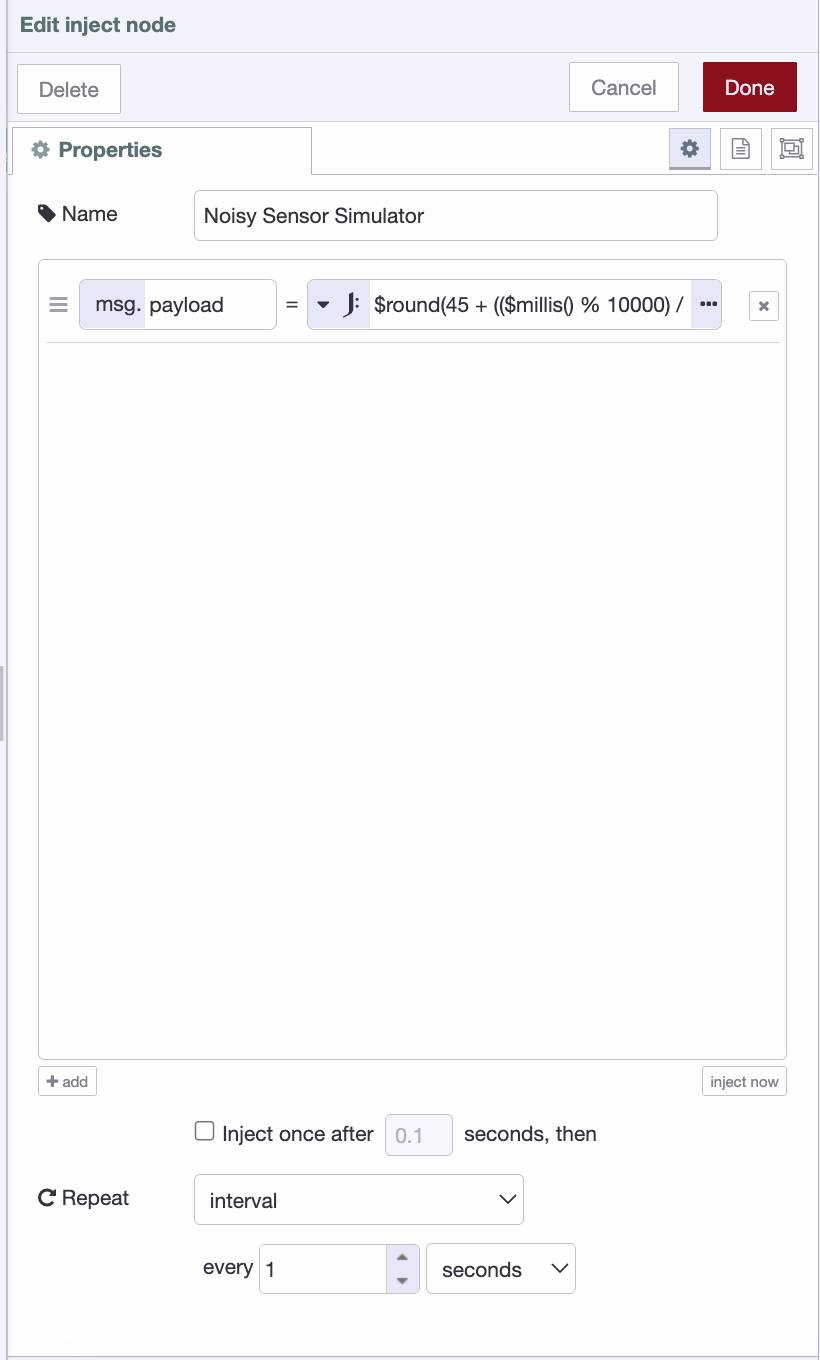 Inject node configured to simulate a noisy sensor, generating a drifting value with added jitter every second.
Implementing a deadband filter
FlowFuse has a built-in filter node that handles deadband filtering out of the box. No code required. It only passes data when the payload has changed by more than a specified amount, which is exactly what a deadband filter does.
Step 1: Add the filter node
- In your palette, search for filter.
- Drag it onto the canvas.
Step 2: Place it in your flow
- Position the filter node between your sensor input node and your output node.
- Wire the sensor input to the filter node input, and the filter node output to your output. Whether that is a dashboard node, a database write node, or an MQTT broker.
Step 3: Configure the filter node
- Double-click the filter node to open its settings.
- Set the Mode to
block unless value change is greater than. - Enter your deadband value in the threshold field. You can use an absolute value such as
1.5or a percentage such as5%. - Set the comparison to
compared to last input value. This ensures each new value is compared against the last value that was actually forwarded. - Leave the Property as
msg.payloadunless your sensor data arrives on a different property. - If your flow handles multiple sensors on different topics, check Apply mode separately for each and set it to
msg.topic. This allows a single filter node to handle multiple sensors independently. - Click Done and deploy your flow.
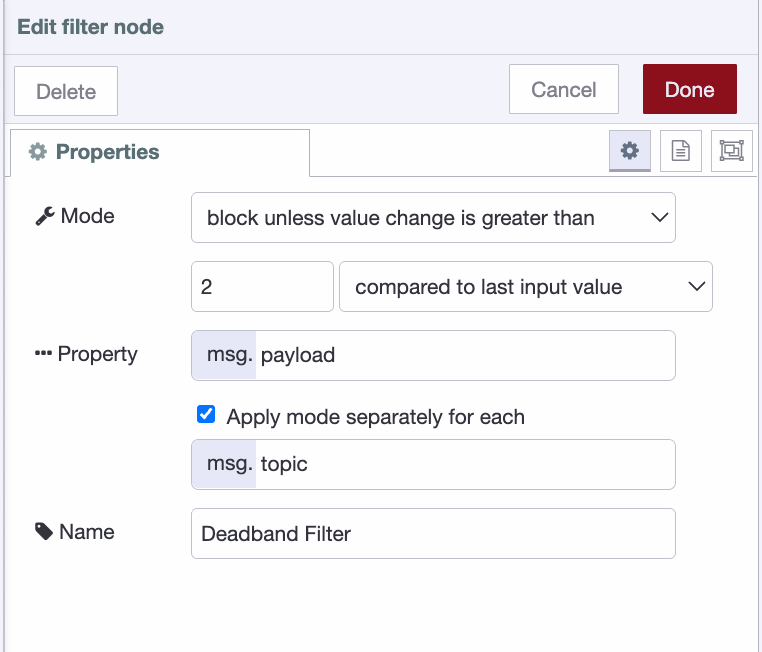 Filter node configured in deadband mode with threshold set to 2.5. Only values that differ by more than 2.5 units from the last accepted reading are passed downstream.
Note: The first value that arrives is always passed through and stored as the reference point. From that point on, every incoming value is compared against it. Only values that differ by more than the threshold are forwarded. When one is, it becomes the new reference point for all comparisons that follow.
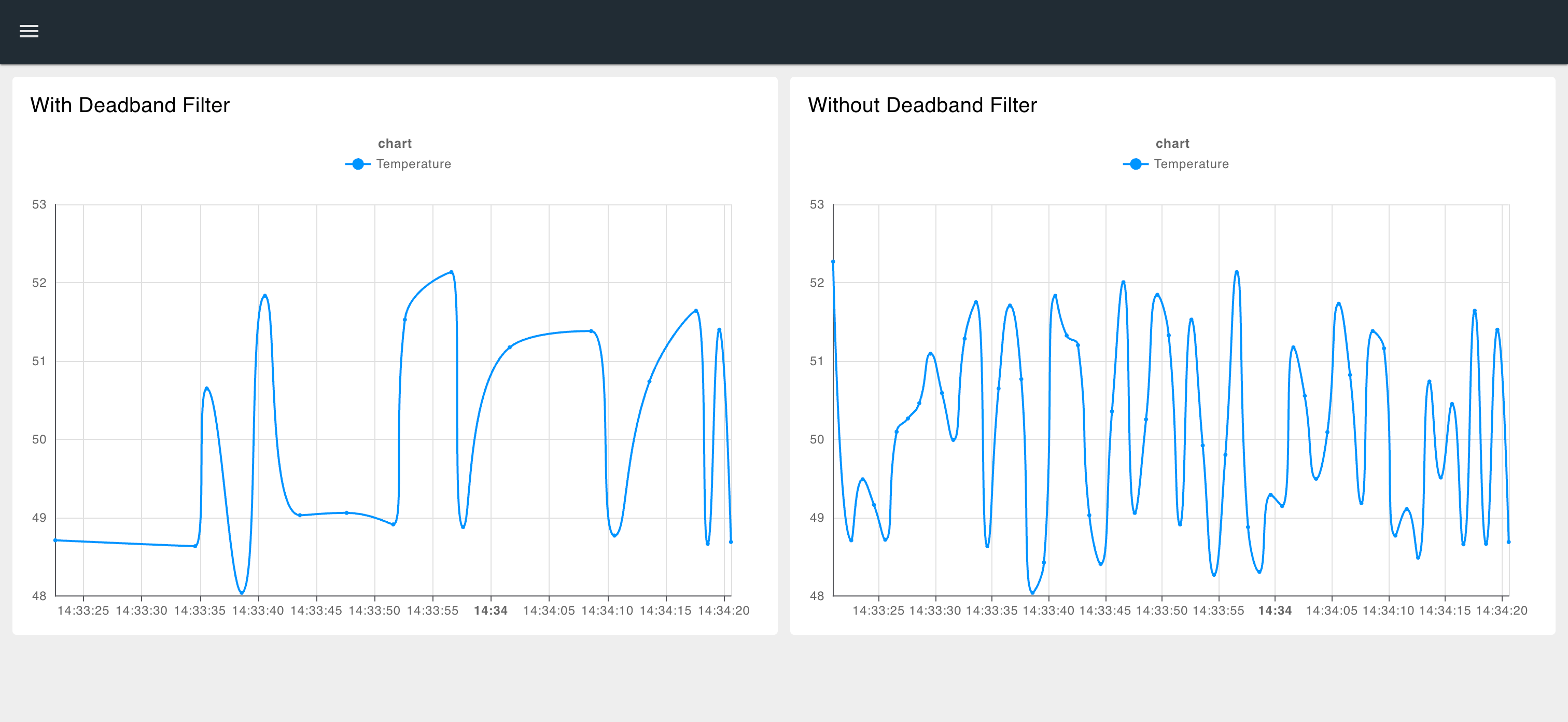 The dashboard above shows two charts connected to the same sensor data. The left chart has the deadband filter applied, the right does not. Notice the noise difference.
Conclusion
Noisy sensor data is one of those problems that looks small until it is not. False alarms, worn actuators, bloated historian databases, and dashboards that are impossible to read. All of it traces back to the same root cause. A control system reacting to every fluctuation instead of only the ones that matter.
A deadband filter solves this with a single comparison. No complex logic, no additional infrastructure, no performance overhead. Just a threshold and a rule, applied consistently to every incoming reading.
But filtering noise is just one piece of a reliable industrial data pipeline. FlowFuse goes further. It simplifies collecting data from any device or protocol, implementing patterns like deadband filtering, store and forward to handle network interruptions, dead letter queues to catch and recover failed messages, and much more. All of it managed centrally, deployed consistently, and running reliably across your entire fleet.
The filter handles the noise. FlowFuse handles everything else.
For more on how FlowFuse connects PLCs and sensors, via OPC UA, Modbus, EtherNet/IP, and Siemens S7, to MQTT, cloud, and enterprise systems, see the FlowFuse PLC integration overview.
Start Building Cleaner Industrial Pipelines Today
FlowFuse makes it easy to connect, filter, and manage industrial sensor data across your entire fleet. Start your free trial and get your first flow running in minutes.
About the Author
Sumit Shinde
Technical Writer
Sumit Shinde is a Technical Writer at FlowFuse specializing in industrial automation and manufacturing. In the past three years, he has built industrial applications and authored more than 100 technical articles covering industrial connectivity, unified data architecture, production metrics, and quality management for modern manufacturing.
Like what you're reading?
Add FlowFuse as a preferred sourceOn the page that opens, check the box next to flowfuse.com to see more of our articles in your Google Search results.
Related Articles:
- A Control Plan Template Your Shop Floor Will Actually Use
- End of Line Testing: Your Final Defense Against Defects
- Quality Assurance vs Quality Control: Fixing the Process or Checking the Product
- Buyer's Guide: How to Evaluate an Edge AI Platform for Industrial Use
- CQI-9 Heat Treat Audit: A Drifting Thermocouple Can Fail the Whole Furnace