node-red-contrib-moment
Node-Red Node that produces formatted Date/Time output using the Moment.JS library. Timezone, dst and locale aware.
node-red-contrib-moment
Please note that this node is unlikely to recieve further enhancements now that moment.js is built into JSONata and so is available from change, function and other nodes.
Node-RED node moment produces a nicely formatted Date/Time string using the Moment.JS library. The node is fully time zone/DST/locale aware.
Node humanizer converts time durations (time spans) into textual descriptions (e.g. 2 minutes).
Both nodes are locale aware regarding the language of the output strings.

Fig. 1: Node appearance













Based on thoughts from a conversation in the Node-RED Google Group. Updated with timezone/locale capabilities after Jaques44's initial work. Updated with +/- adjustments after another conversion in the Google Group.
Installation
In Node-RED (preferred)
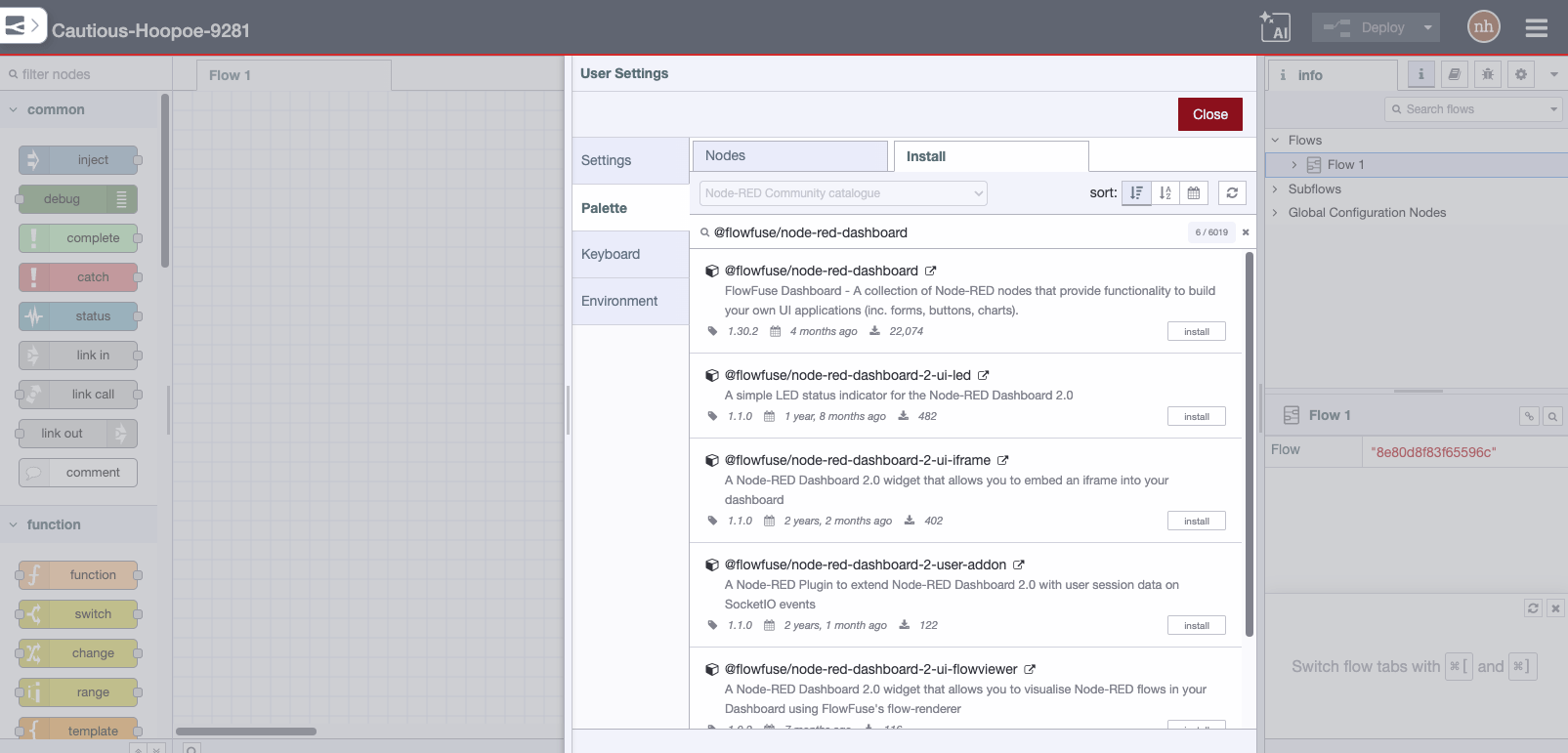
- Via Manage Palette -> Search for "node-red-contrib-moment"
In a shell
Basic installation:
- go to the Node-RED "userDir" folder, typically
~/.node-red - run
npm install node-red-contrib-moment
To get the latest development version, install with:
- run
npm install TotallyInformation/node-red-contrib-moment
Usage of node moment
The easiest usage of the node is feeding it with an timestamp inject:

Fig. 2: Basic usage node moment
Updates
Please see the CHANGELOG document.
Usage
Moment
The node generally expects an input from the incoming msg. By default, this is msg.payload. If it is a recognisable date/time, it will apply a format and output the resulting string or object accordingly.
Input and output time zones are settable as is the output locale. All of which default to the host systems tz/locale.
This allows the node to be used to translate from one time zone to another. It also will take into account daylight savings time (DST).
You can also apply an adjustment to the date/time by adding or subtracting an amount.
Configuration of node moment
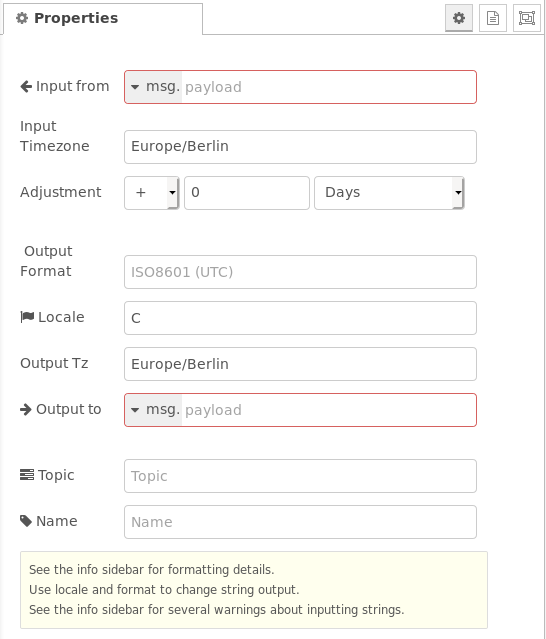
Fig. 3: Properties of node moment
Input from and Output to
These two configuration properties define the msg properties in which the input and output data are read from resp. written to. Default is msg.payload.
Input Timezone and Output Timezone
Input Timezone
This property defines the timezone of the time fed via the input msg. Internally the input time is converted into UTC for further processing.
The format of Input Timezone is in the format region/location, e.g. Europe/London. See also timezone lists e.g. built in to moment-timezone or given in wikipedia.
Note: Spellings are not validated, if it doesn't seem to work, check the validity of region/location with these timezone lists.
The following behaviour is valid:
- If the input data contains a Node-RED timestamp this property is ommitted
- If the host system has a local timezone set (e.g.
dpkg-reconfigure tzdataon Linux), the input timestamp is related to this local timezone. - If the host system has no local timezone set, the input timestamp is related to UTC.
- If the host system has a local timezone set (e.g.
- If the input data contains an interpretable string, this property is used (to convert internally to UTC).
If left blank in settings, this field may be set from the incoming msg.inTz property.
Output Timezone
This property defines the timezone of the time emitted via the output msg.
The format of Output Timezone is described above (see Input Timezone).
The following behaviour is valid:
-
If Output Format is left blank, the output format is in 'Zulu' format, independent of the contents of the additional properties Output Timezone and Locale.
Zulu format see: https://momentjs.com/docs/#/displaying/as-iso-string/
(Example: 2013-02-04T22:44:30.652Z)
If left blank in settings, this field may be set from the incoming msg.outTz property.
Adjustment
Using this property, the time can be adjusted by a manually given value. Adjustments can be positive or negative and can be given in milliseconds, seconds, minutes, hours, days, weeks, months, quarters, years.
Output Format and Locale
These two properties in combination define the output format emitted in the output msg.
Output Format
The Output Format property defines the format and is described in the moment.js displaying format section.
It may be any format string defined by moment.js. The formatting additions from moment-timezone are also allowed. In addition, further (not case sensitive, alternatives in brackets) format strings are also allowed.
Note that with the exception of ISO8601, other formats are in the specified timezone & DST. If not specified, the output timezone/DST is the same as the input.
Use an output timezone of UTC to force output to that.
Format string defined by moment.js
The format string defined by moment.js basically has two options:
-
Manual given format string: This is a string where the time/date parts are represented by characters. Also text parts are allowed. Examples:
- "DD.MM.YYYY HH:mm" gives 20.09.2020 08:30
- "dddd, MMMM Do YYYY, h:mm:ss a" gives Sunday, February 14th 2010, 3:25:50 pm
- "[Today is] dddd" gives Today is Sunday
- "[Date: ]YYYY-MM-DD [Time: ]HH:mm:ss" gives Date: 2020-09-20 Time: 08:31:45
- "fromNow" gives in a month
- "calendar" gives Last Monday
-
Predefined localized string: This is a string which defines a localized format. Examples:
- "LLL" gives October 20, 2020 8:33 AM
- "LTS" gives 8:30:25 PM
- "llll" gives Thu, Sep 4, 1986 8:30 PM
For more options see https://momentjs.com/docs/#/displaying/format/.
Format string is left blank resp. is "ISO8601" or "ISO"
In this case the output is in ISO 8602 format, e.g. "2015-01-28T16:24:48.123Z".
Note that ISO8601 formatted output is ALWAYS in UTC ('Z', Zulu time) not local, no matter what output timezone you may specify.
See also moment().toISOString().
Format string is "date" resp. "jsDate"
This is a Javascript Date object in the form {years:nnnn, months:n, date:n, hours:n, minutes:n, seconds:n, milliseconds:n}.
It may be used for manual (fixed) data/time values.
WARNING: moment.js has a bizarre object format where the month is zero-based (0-11) instead of 1-based (1-12) like all the other elements are. I don't currently know why, I've raised an upstream issue but this appears to be a deliberate decision for some strange reason.
See also moment().toObject().
Format string is "fromNow" resp. "timeAgo"
This is a human readable output, e.g. 30 minutes ago or in a month (only rough time spans are given in this output format type, see also the humanizer example below). The time span is derived from the actual time and the time fed into the node.
See also moment().fromNow().
Format string is "calendar" resp. "aroundNow"
This is a human readable alternative, e.g. Last Monday or Tomorrow 2:30pm. Note that dates beyond a week from now are output as yyyy-mm-dd.
See also moment().calendar().
Format string is "date" resp. "jsDate"
This output format type is actually not working (see issue #37).
Locale
In case of a textual output string contents the Locale property defines the language of the textual parts (e.g. "October" vs. "Oktober" vs. "ottobre" vs. "lokakuuta").
If the output is shown in the wrong format, such as dates in US mm/dd/yy format, change the output locale. For example, using en_gb will force short dates to output in dd/mm/yy format. The default is en which moment assumes means the USA :-(
See also Locale Helper (Note: Not every locale given there is supported).
Topic (additional topic)
Using this property you can add an additional topic to the output msg.topic.
A resulting msg may be (value "myTopicString"):
{"_msgid":"b16b00b5.bada55","payload":"2020-09-20T12:47:55.143Z","topic":"myTopicString"}
Input of node moment
Input values in the object Input from can be of the following types:
-
timestamp: The current date/time is used as input.
-
msg, global or flow and the given property is empty or does not exist: The current date/time is used as input.
-
JSON date time object: This data time object may contain the following elements: years, months, days, hours, minutes, seconds, milliseconds.
Example:
{"years":2020,"months":1,"date":11,"hours":5,"minutes":6}.If elements are not given (e.g. years and months are missing in the object) the actual time values are used instead.
-
a property containing a string that is a recognizable date/time: The value will be interpreted and processed.
Example:
2020-02-11T05:06 -
a property containing a numeric value: The value will be assumed to be a UNIX time value (ms since 1970-01-01). Remark: This is the format which the node Inject emits at option timestamp.
-
a property containing a string that is not a recognisable date/time (including
null): Then no conversion takes place, the output will be an empty string plus a debug warning.
Note that parsing date/time strings is a hard problem. moment.parseFormat helps but it isn't magic. We assume that ambiguous input dates such as 3/5/05 are in EU/UK format dd/mm/yy unless either the input timezone is in America or the locale is set to en_US.
Outputs of node moment
If the output property is not msg.payload the input msg.payload is retained in the output.
The date/time output is a formatted string if the configuration property Output Format is anything other than date resp. jsDate or object in which case the output is a Javascript date object or an object as described below respectively.
Output string formatting is controlled by the Locale and the Output Format setting. Note that the output Timezone is ignored for ISO8601 output (the default), such output is always in UTC. For other formats, the output will be in the specified timezone which defaults to your host timezone.
Specifying different input and output timezones allows you to translated between them.
The output msg will pass through the input msg.topic unless it is overridden by the Topic configuration property. If the Output to field is changed from the default msg.payload, the input msg.payload will also be passed through.
Usage of node humanizer
This node converts an input time span to a humanized text string to the output msg.payload.humanized. The language of the output string is derived from the locale of the system, i.e. it is not changeable (like the Locale property of the moment node).
See also moment.duration().humanize().
(Contributed by Laro88)
Configuration of node humanizer
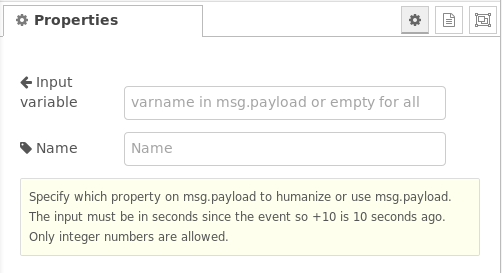
Fig. 4: Properties of node humanizer
'Input variable'
This property defines the input msg.payload property which shall be used for the conversion. If left blank, msg.payload is used.
Input of node humanizer
The input is a number which defines a time span in seconds.
Outputs of node humanizer
The output is a string object in msg.payload.humanized.
The time spans are evaluated in intervals, see humanizer example for details.
Examples
Remark: Example flows are present in the examples subdirectory. In Node-RED they can be imported via the import function and then selecting Examples in the vertical tab menue.
All example flows can also be found in the examples folder of this package.
Usage of the moment node
The basic usage is shown in Fig. 2. The following examples shall give an overview how to use the rich configuration properties.
Usage of configuration properties Output Timezone, Output Format and Adjustment
A sample flow is:
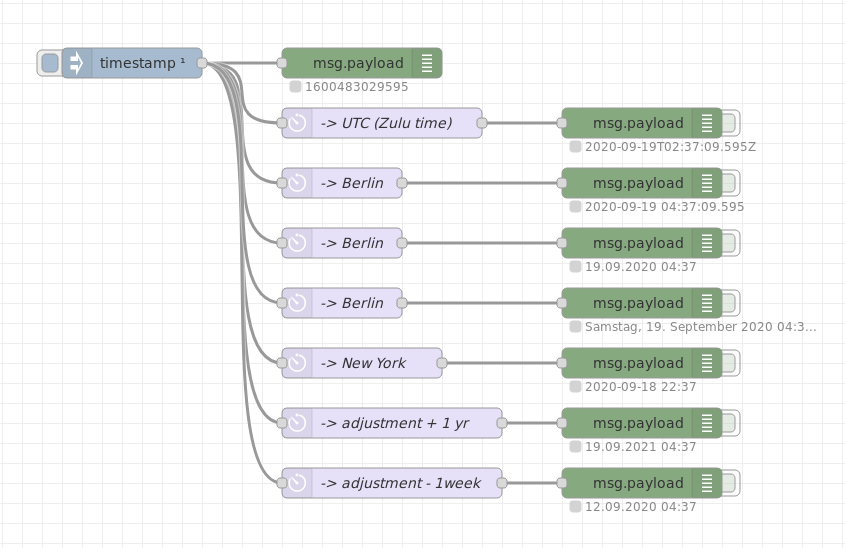
output-timezone-format-adjustment flow
Fig. 5: Example flow showing the usage of Output Timezone, Output Format and Adjustment
Usage of configuration property Input Timezone
A sample flow is:
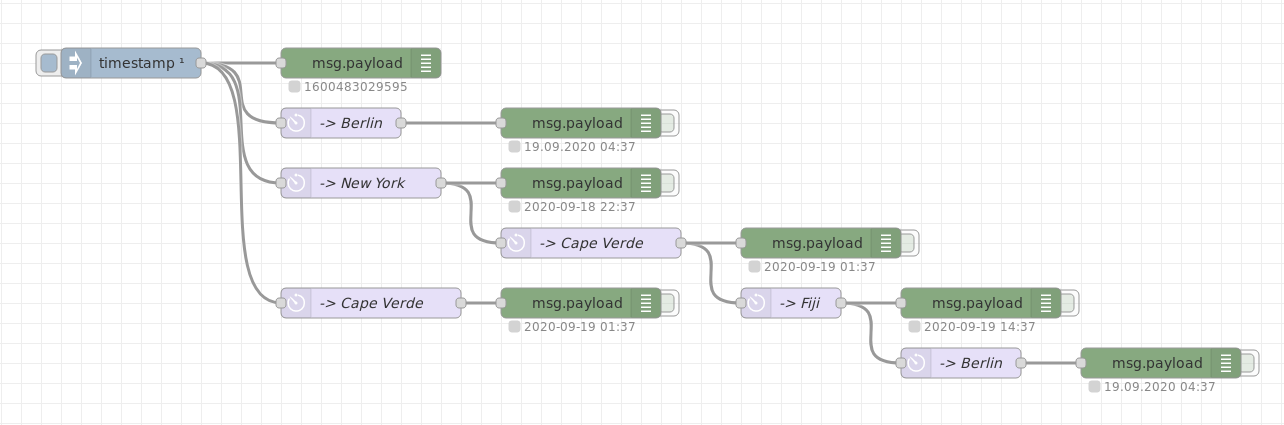
input-timezone flow
Fig. 6: Example flow showing the usage of Input Timezone
Usage of configuration properties Output Format and Locale
A sample flow is:
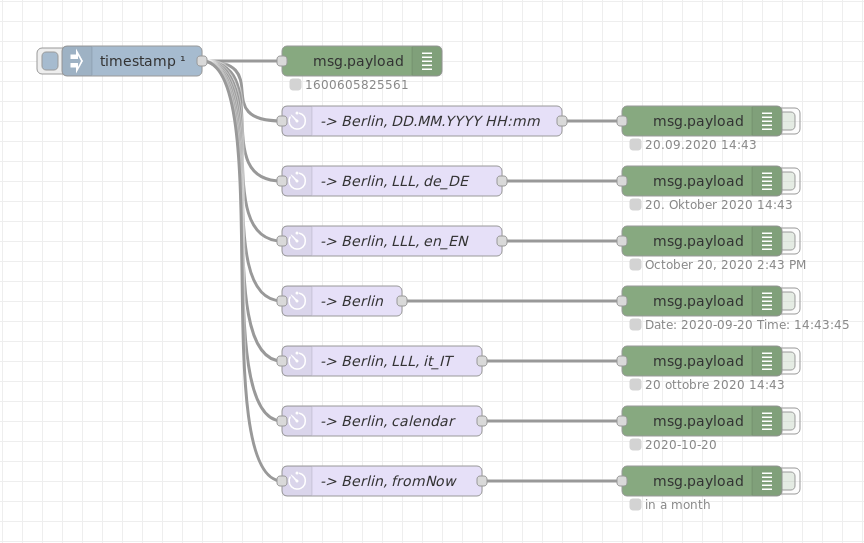
output-format-locale flow
Fig. 7: Example flow showing the usage of Output Format and Locale
Usage of the humanizer node
A sample flow is:
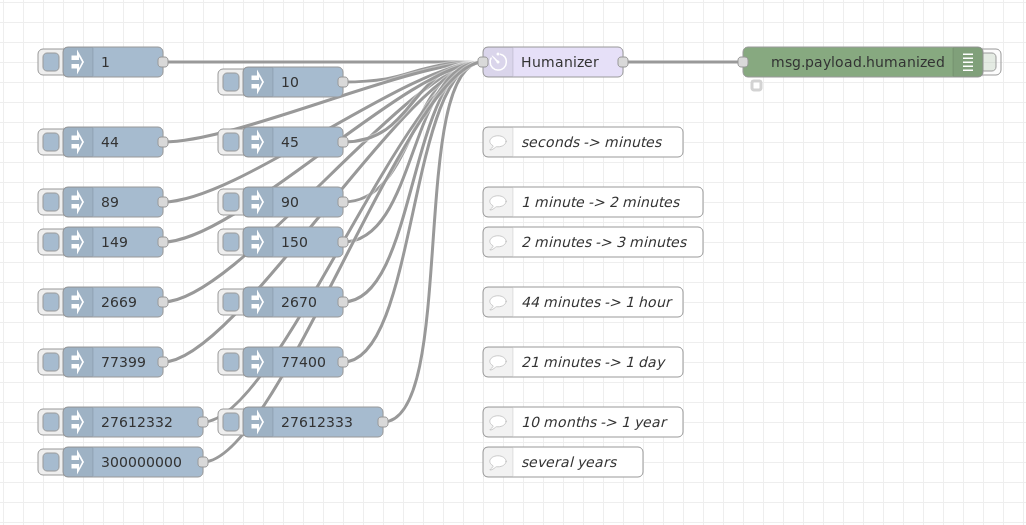
humanizer flow
Fig. 8: Example flow showing the usage of the humanizer node
Depends on
- Moment.js - Clever date/time handler for Node.js and browsers
- Moment-Timezone - Adds timezone and locale awareness to Moment.js
- Zulu time format
- Timezones (tzdata)
- Moment-ParseFormat - Tries to interpret input strings as date/times and creates a format string that moment.js can use.
- Locale Helper - lists locale options
- Node-RED - of course!
To Do
Summary of things I'd like to do with the moment node (not necessarily immediately):
-
[ ] Add some additional nodes for doing date/time calculations - partly complete, can do simple add/subtract from main node
-
[ ] Add additional node for doing duration calculations
-
[ ] Add a combo box to the Format field with common formats pre-populated
-
[x] Improve the error messages when Moment.JS fails to interpret the input (say why)
-
[x] Allow more input date/time formats - turns out Moment.JS doesn't really help here. At present, I see too many input failures from US/UK date formats, etc. It would be great if I could parse "human" inputs like "tomorrow" and "2 minutes from now". We can output them now but not input them. As of v1.0.5, a localisation parameter is supported.
Partly complete: Added the parseFormat plugin. That failed, see code for details.Now complete.
License
This code is Open Source under an Apache 2 License. Please see the apache2-license.txt file for details.
You may not use this code except in compliance with the License. You may obtain an original copy of the License at
http://www.apache.org/licenses/LICENSE-2.0
Unless required by applicable law or agreed to in writing, software distributed under the License is distributed on an "AS IS" BASIS, WITHOUT WARRANTIES OR CONDITIONS OF ANY KIND, either express or implied. Please see the License for the specific language governing permissions and limitations under the License.
Author
Julian Knight (Totally Information), https://github.com/totallyinformation
Contributors/Credits
Many thanks for the contributions.
Feedback and Support
Please report any issues or suggestions via the Github Issues list for this repository.
For more information, feedback, or community support see the Node-RED Google groups forum at https://groups.google.com/forum/#!forum/node-red