FlowFuse 2.29: FlowFuse Expert Comes to Self-Hosted Enterprise
Self-Hosted Enterprise customers can now enable FlowFuse Expert. Plus Azure DevOps Git support and clearer snapshot comparisons.
FlowFuse 2.29 brings three main updates: FlowFuse Expert is now available for self-hosted enterprise customers and can execute actions directly in the Node-RED editor; Azure DevOps is now a supported Git provider for GitOps workflows; and snapshot comparisons now include a property-level diff sidebar with git-style line diffs. The release also ships Node-RED 4.1.8 as a stack option.
FlowFuse 2.29 gives teams more control over how flows move through their stack, makes it easier to understand what changed between versions, and brings FlowFuse Expert to self-hosted enterprise customers.
FlowFuse Expert, Available to More Teams and More Capable
FlowFuse Expert is our integrated AI assistant, one consistent surface across the FlowFuse website, platform, and immersive Node-RED editor for troubleshooting, building, and getting targeted help.
Self-Hosted Enterprise
FlowFuse Expert was previously only available to cloud customers. Self-hosted enterprise teams had no equivalent surface for in-context troubleshooting and guidance.
Expert is now available for self-hosted enterprise FlowFuse instances. Your team gets the same contextual guidance and targeted help as cloud customers, with your operational data staying on your own infrastructure.
Contact us to enable Expert on your self-hosted environment.
Take Action Directly from Expert Responses
Expert responses previously surfaced information and suggestions. Acting on them, importing a flow, selecting relevant nodes, opening a new tab, required switching out of the conversation and doing it manually.
Expert responses can now include clickable action links. Click one and Expert performs the action directly in your editor: opening a new flow tab, selecting the nodes it just mentioned, or importing a flow from the conversation.
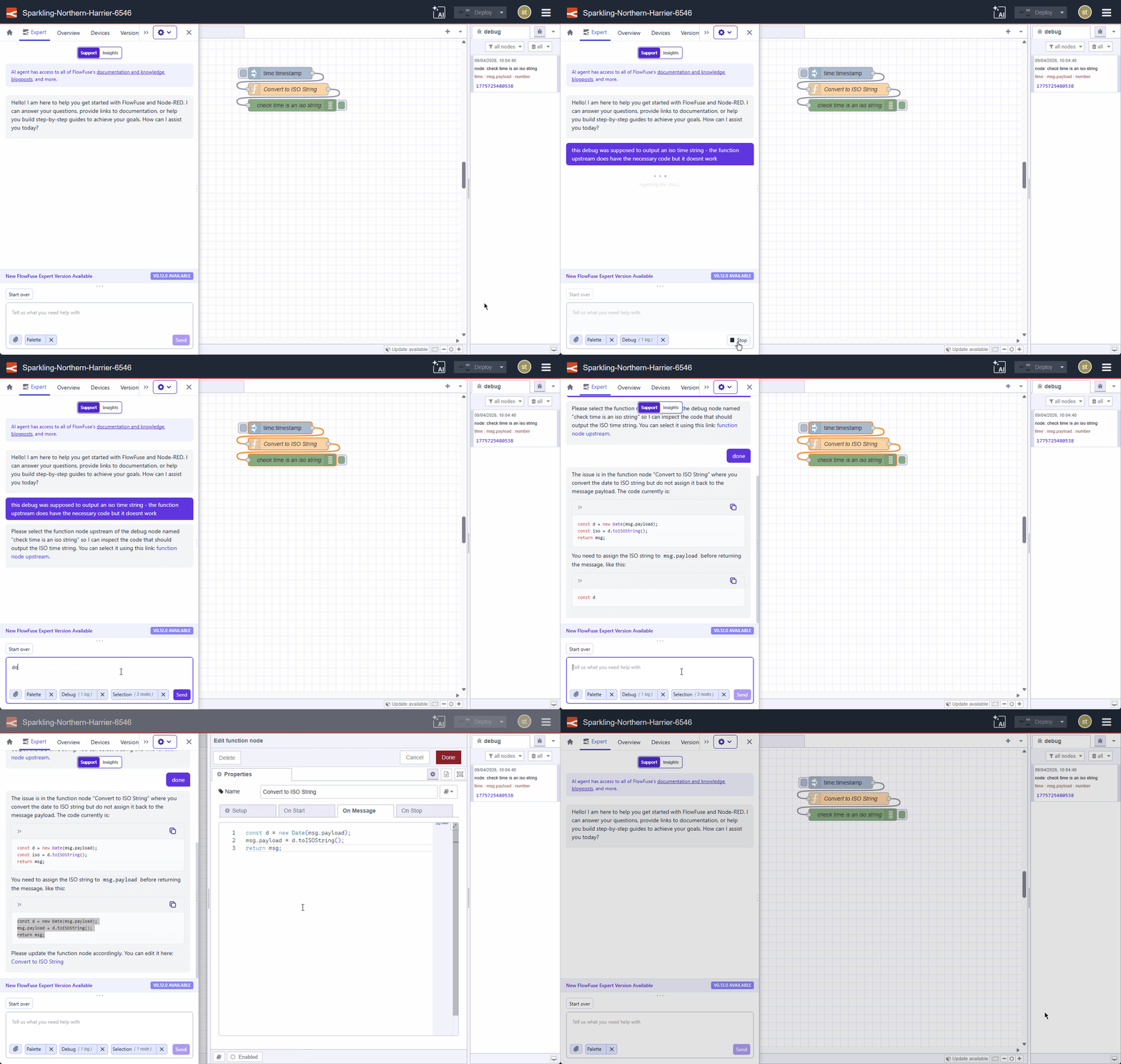
Coming next: spinning up Node-RED instances directly from Expert, letting you go from idea to running flow without leaving the chat.
In practice
- You act on Expert suggestions in one click instead of manually applying them
- You stay in the conversation while Expert works in your editor
More Visibility and Control Across Your Deployment Workflow
Managing flows across environments means tracking what changed, when, and by whom. When tooling gaps introduce friction here, or leave your version control workflow fragmented, they slow teams down at exactly the wrong moment.
Azure DevOps Git Integration
FlowFuse's GitOps support previously required GitHub. Teams standardised on Azure DevOps had no native way to include Node-RED flows in their existing version control workflow.
FlowFuse 2.29 adds Azure DevOps as a supported Git provider. You can now push and pull snapshots directly from Azure DevOps repositories using Personal Access Tokens, configured under Team Settings → Integrations.
In practice
- You connect Azure DevOps repos alongside or instead of GitHub
- Your Node-RED flows participate in the same version control workflow as the rest of your stack
- You authenticate with Azure Personal Access Tokens, with no secondary tooling required
See Exactly What Changed in a Snapshot
FlowFuse's snapshot comparison view showed flows side by side, but the visual alone doesn't always tell the whole story. You could see that a node was different, but not which specific property changed. When a function node's code changed, you couldn't identify which lines were different without manually diffing two code blocks outside of FlowFuse.
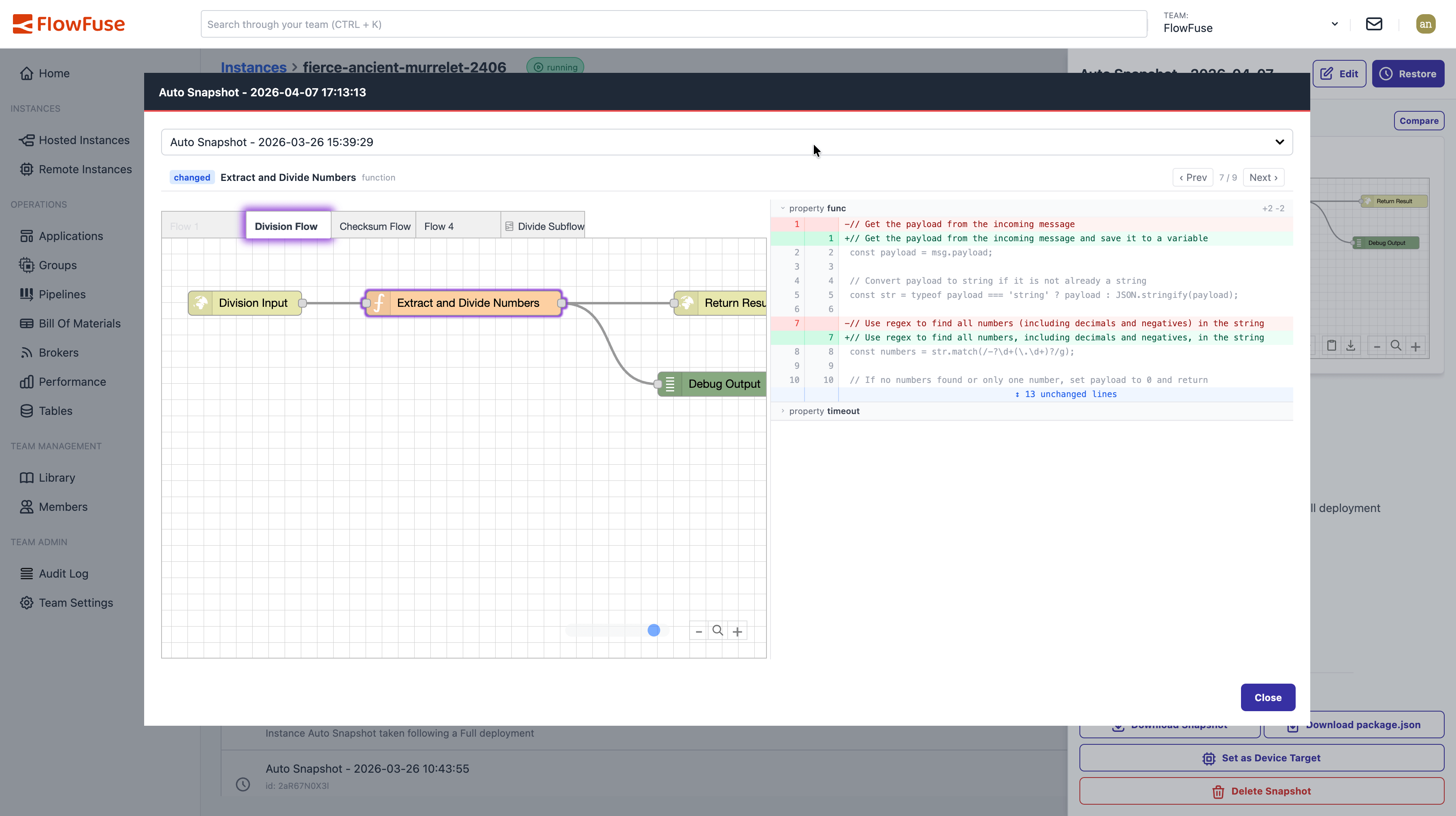
The compare dialog now includes a property-level diff sidebar: structural property changes old to new at a glance, and git-style line diffs for function code, template HTML, and JSON. A navigation bar steps through every changed, added, or deleted node with arrow key shortcuts. The canvas highlights and scrolls to the current node as you navigate.
In practice
- You review what changed between dev and production without leaving FlowFuse
- You validate a teammate's update at the property level, not just the node level
- You debug why a flow changed after a deploy with the same tooling you use to promote it
What else is new?
- Expert opens by default: FlowFuse Expert now opens automatically when you visit the editor for the first time. If you close it, that preference is remembered across browser sessions.
- Embedded editor tab titles: Hosted and Remote Instance editor tabs now show the actual Node-RED flow name rather than a generic title.
- Instance URL env var: Hosted Node-RED instances now expose an
FF_INSTANCE_URLenvironment variable containing the instance's URL (default or custom hostname). Useful for flows that need to know their own address, like webhook callbacks or OAuth redirects. - Blueprint markdown rendering: Blueprint descriptions now support markdown rendering, so formatting like headers and lists display as intended.
Fixes
- MCP server discoverability: Older MCP servers that were registered on your instances were not showing up in Expert Insights mode. All registered MCP servers are now discoverable again.
- Snapshot detail in the immersive editor: Reviewing a snapshot from inside the immersive editor now opens it in a modal, so you can inspect snapshots without leaving the editor.
- Developer Mode tab restored in the immersive editor: The Developer Mode tab is back in the immersive editor drawer, letting you toggle Auto Snapshots and create snapshots without opening a second window.
Node-RED
Node-RED 4.1.8 is now available as a stack option in FlowFuse. Highlights include function node tab badges (see at a glance which tabs contain code), theme plugin overrides for settings and menu options, configurable palette categories via theme plugins, and show-first/last-tab keyboard actions.
Looking ahead, Node-RED 5.0 is in beta. It's a modernization and UI re-architecture that readies Node-RED for better AI-guided development and brings more clarity to manual editing. FlowFuse will ship 5.0 once it reaches stable release.
For detailed breakdowns of each feature with additional visuals, visit our changelog. For the complete list of everything included in FlowFuse 2.29, check out the release notes.
If something in this release improves your workflow, or if there is still friction we can remove, please share feedback or report issues regarding this release to us.
Try the latest FlowFuse improvements in your own environment
Use Expert to take action in your editor, connect Azure DevOps to your workflow, and see exactly what changed between snapshots.
About the Author
Dimitrie Hoekstra
Product Manager
Product manager with a technical product design background, continuing to be meticulous about user-centric design, now shaping how industrial IT/OT teams are made more effective through AI at FlowFuse.
Like what you're reading?
Add FlowFuse as a preferred sourceOn the page that opens, check the box next to flowfuse.com to see more of our articles in your Google Search results.