# Delay
## What's the Delay node in Node-RED used for?
The Delay node allows you to introduce a delay in the flow of messages between nodes. It can be useful in various scenarios where you need to control the timing of message processing. For example, the delay node can limit the rate at which messages are processed downstream or throttle the flow of messaging. Both can be useful for interacting with external systems that may have limitations in place.
Here are some other use cases for using the Delay node:
**Batch Processing**: If you're dealing with a stream of incoming data that you want to process in batches, you can use the Delay node to introduce a delay between groups of messages. This can be helpful when you need to aggregate or analyze data in chunks.
**Sequential Processing**: Sometimes you need to ensure that messages are processed in a specific order. The Delay node can be used to enforce a sequence of message processing, especially when dealing with asynchronous systems that might not guarantee order.
**Simulation and Testing**: In testing and simulation scenarios, you might want to mimic real-world timing conditions. The Delay node can help you introduce delays that simulate actual conditions, allowing you to test how your system behaves over time.
**Time-based Triggers**: You can use the Delay node to trigger actions at specific time intervals. For instance, you might want to send a status update every hour or perform a cleanup task at the end of the day.
**Circuit Breaker**: The Delay node can be employed as a simple form of circuit breaker. If a downstream system is failing or experiencing issues, you can introduce a delay before retrying, giving the system some time to recover.
## Examples for the Delay node
An example of using the Delay node to rate limit http request to an external API.
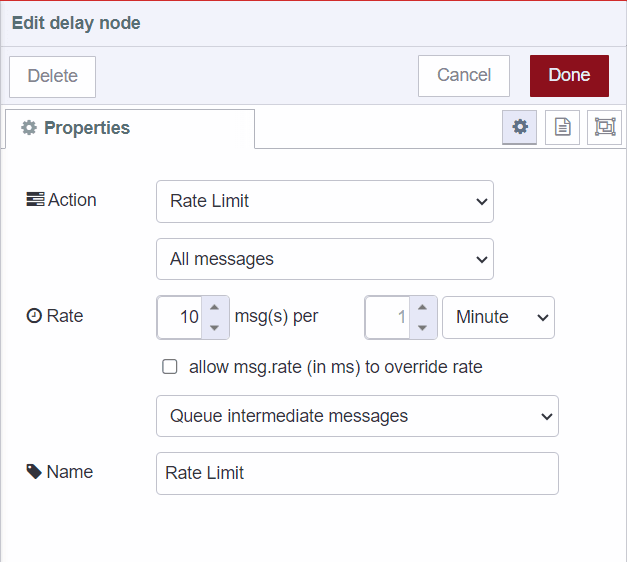
```json
[{"id":"1f825afc.866efc","type":"delay","z":"e92fb6c3b304fd7c","name":"Rate Limit","pauseType":"rate","timeout":"20","timeoutUnits":"seconds","rate":"10","nbRateUnits":"","rateUnits":"minute","randomFirst":"1","randomLast":"5","randomUnits":"seconds","drop":false,"allowrate":false,"outputs":1,"x":620,"y":120,"wires":[["26f1f0e3.65e3c8"]]}]
```
### Reset the queue for the delay node
The Delay node might create a queue that will continue their journey to the connected output nodes.
There's situations however where the queue needs to be cleared. This is done by resetting the queue.
When a `reset` property is set, the queue will be empty.
This is useful for when the lack of an event might need to send a notification. Schedule the notification
to be sent but allow a positive event to cancel the notification. In the example below; say you want to turn off the lights if no movement was detected for a period of time, you set the delay node to that time. When there's motion detected, you than send a `msg.reset` message to the delay node to cancel them turning of the light. This depends on an inject node set to [send a message on an interval](/docs/node-red/core-nodes/common/inject/#run-a-flow-daily-at-midnight) to turn the lights off.
```json
[{"id":"06b93157ff07c9b1","type":"delay","z":"e512003df3c971c7","name":"","pauseType":"delay","timeout":"5","timeoutUnits":"seconds","rate":"1","nbRateUnits":"1","rateUnits":"second","randomFirst":"1","randomLast":"5","randomUnits":"seconds","drop":false,"allowrate":false,"outputs":1,"x":460,"y":100,"wires":[["f345c902d09aaf76"]]},{"id":"1965e58562943d69","type":"inject","z":"e512003df3c971c7","name":"Motion detected","props":[{"p":"reset","v":"true","vt":"bool"}],"repeat":"5","crontab":"","once":false,"onceDelay":0.1,"topic":"","x":250,"y":160,"wires":[["06b93157ff07c9b1"]]},{"id":"f345c902d09aaf76","type":"debug","z":"e512003df3c971c7","name":"Never receive a message","active":true,"tosidebar":true,"console":false,"tostatus":false,"complete":"payload","targetType":"msg","statusVal":"","statusType":"auto","x":670,"y":100,"wires":[]},{"id":"834f0812a01be7a4","type":"inject","z":"e512003df3c971c7","name":"Turn off lights","props":[{"p":"payload"}],"repeat":"10","crontab":"","once":false,"onceDelay":0.1,"topic":"","payload":"","payloadType":"date","x":260,"y":100,"wires":[["06b93157ff07c9b1"]]}]
```