# FlowFuse Architecture
A FlowFuse install is made up of 2 main components
- The Management Application
- The Node-RED instances
These can be deployed in one of 2 ways
- On a single machine
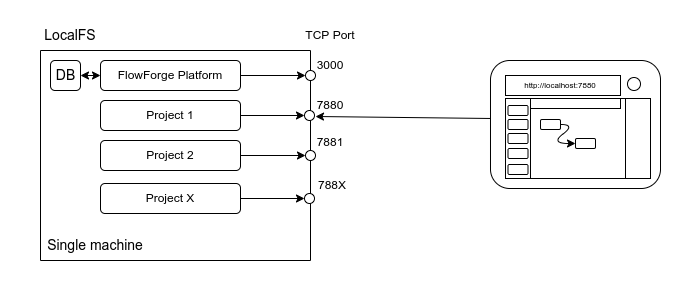
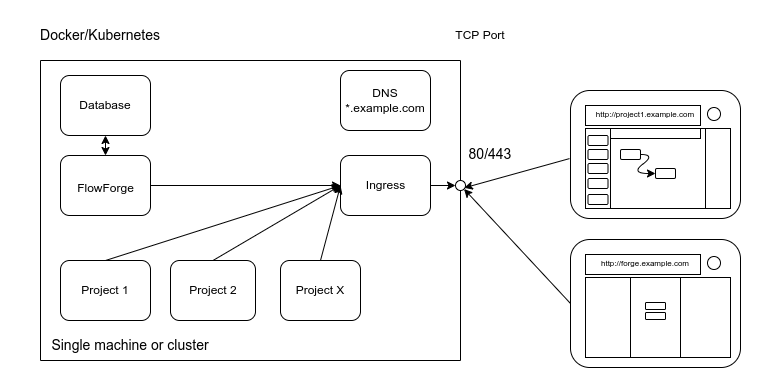
- Using a Container Orchestration platform (Kubernetes/Docker Compose)
## FlowFuse Management Application
This provides the interface for managing the objects in the platform. It also
provides a collection of APIs to support the Node-RED instances once started.
A key component is the Container API driver, this is the part that actually creates/destroys
Node-RED instances and keeps track of what should be running and restarts if needed.
### Container Drivers
Node-RED instances are started by the FlowFuse Management Application via one of the following Container Drivers. Documentation for the Container Driver API will be available in the [API](/docs/api) section.
#### Localfs
This driver runs Node-RED as separate processes on the same machine as the FlowFuse Management Application. Each instance gets its own `userDir` and a dedicated TCP/IP port to listen to.
State is stored in a local SQLite database
There is no automatic Ingres automation provided by this driver.
#### Kubernetes
This driver runs Node-RED in separate containers and each instance is accessed by a dedicated hostname via an HTTP Ingres proxy.
The state is stored in a provided PostgreSQL database.
Node-RED containers are segregated into their own namespace (currently hardcoded to `flowforge`)
The driver uses the [@kubernetes/client-node](https://www.npmjs.com/package/@kubernetes/client-node) to interact with the cluster.
The driver will create the required Service and Ingres Kubernetes resources to expose each instance via whatever Ingress Controller the underlying Kubernetes cluster provides.
#### Docker-Compose
This driver runs Node-RED in separate containers and each instance is accessed by a dedicated hostname via an HTTP Ingres proxy.
The state is stored in a provided PostgreSQL database.
The driver uses the [dockerode](https://www.npmjs.com/package/dockerode) to interact with the cluster.
The driver will add the required Environment variables to each Node-RED container to work with the [jwilder/nginx-proxy](https://hub.docker.com/r/jwilder/nginx-proxy) NGINX proxy.
## FlowFuse Instances
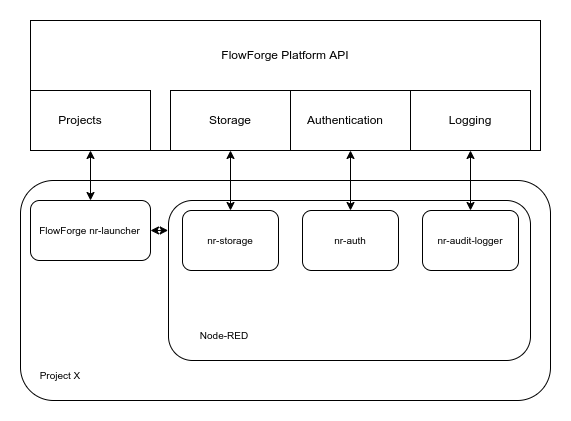
A FlowFuse Node-RED Instance is made up of 2 processes
- The FlowFuse Launcher
- A Node-RED instance
### FlowFuse Launcher
This is a small application that handles downloading the Instance specific settings, building a `settings.js` from those settings and then starting the Node-RED instance.
The launcher presents an HTTP API (it defaults to the Node-RED port + 1000) that allows the FlowFuse Management Application to start/stop/restart the Node-RED instance as well as query its current state and retrieve the console logs.
The launcher can be found [here](https://github.com/FlowFuse/nr-launcher)
Within the launcher are some custom plugins that are loaded by Node-RED:
#### nr-storage
This plugin is used to save flows, settings, sessions, and library entries back to the FlowFuse Management Application.
#### nr-auth
This plugin is used to authenticate users trying to access the Node-RED Editor, it refers back to the FlowFuse Management Application to ensure only members of the team that owns the instance can log in.
This plugin uses the Node-RED [Authentication API](https://nodered.org/docs/user-guide/runtime/securing-node-red#custom-user-authentication)
#### nr-audit-logger
This plugin sends Node-RED Audit events (e.g. user log in and flow deployment events) back to the to the FlowFuse Management Application to allow a reliable audit of what actions have taken place in the instance.
This plugin uses the Node-RED [Logging API](https://nodered.org/docs/user-guide/runtime/logging)
## Component Overview
```mermaid
erDiagram
USER ||--o{ NGINX : Requests
NGINX {
Protocol HTTP-TLS
Port default-443
}
FORGE-APP {
Protocol HTTP-TLS
Port default-3000
}
POSTGRESQL {
Protocol tcp-tls
Port default-5432
}
MOSQUITTO {
Protocol HTTP-TLS-WSS-MQTT
Port default-1883
Port websocket-1884
}
FLOWFORGE-FILE-SERVER {
Protocol HTTP-TLS
Port default-3001
}
NGINX }o--o| NODE-RED : routes
NGINX }o--o{ FORGE-APP: routes
NGINX ||--|| MOSQUITTO: mqtt-ws
FORGE-APP ||--|{ POSTGRESQL: query
FORGE-APP ||--|| NODE-RED: "flow update"
NODE-RED }o--o{ FLOWFORGE-FILE-SERVER: "Blob store"
FLOWFORGE-FILE-SERVER ||--|| FORGE-APP: "Authenticate"
NODE-RED {
Protocol HTTP-TLS
Port default-1880
}
NODE-RED }o--|| MOSQUITTO: mqtt
FORGE-APP }o--|| MOSQUITTO: mqtt
NODE-RED-DEVICES {
Port default-1880
Protocol User-Defined
}
NODE-RED-DEVICES }o--|| NGINX: mqtt-ws
USER ||--|| NODE-RED-DEVICES: Requests
```